Source properties
How the Replicator Service connects to the source database, how many connections it may use, the defaults for new subscriptions, and whether the source is used for incremental replication.
Changes to a source apply to every subscription and group that uses it.
Saving changes
- Changing the connection closes the source's connections. After a change to the connection string, the authentication method, the user ID or the password, the Replicator Service first connects with the new settings to read the source's properties. If it can't, nothing is saved and the error is shown (see Testing the connection). Once you confirm, its active and pooled connections are deleted: replications using the source lose their connection, and the default database and schema are detected again. The same happens when you switch to Advanced after changing the connection.
- Changing incremental settings affects the groups (see Incremental Replication).
Basic
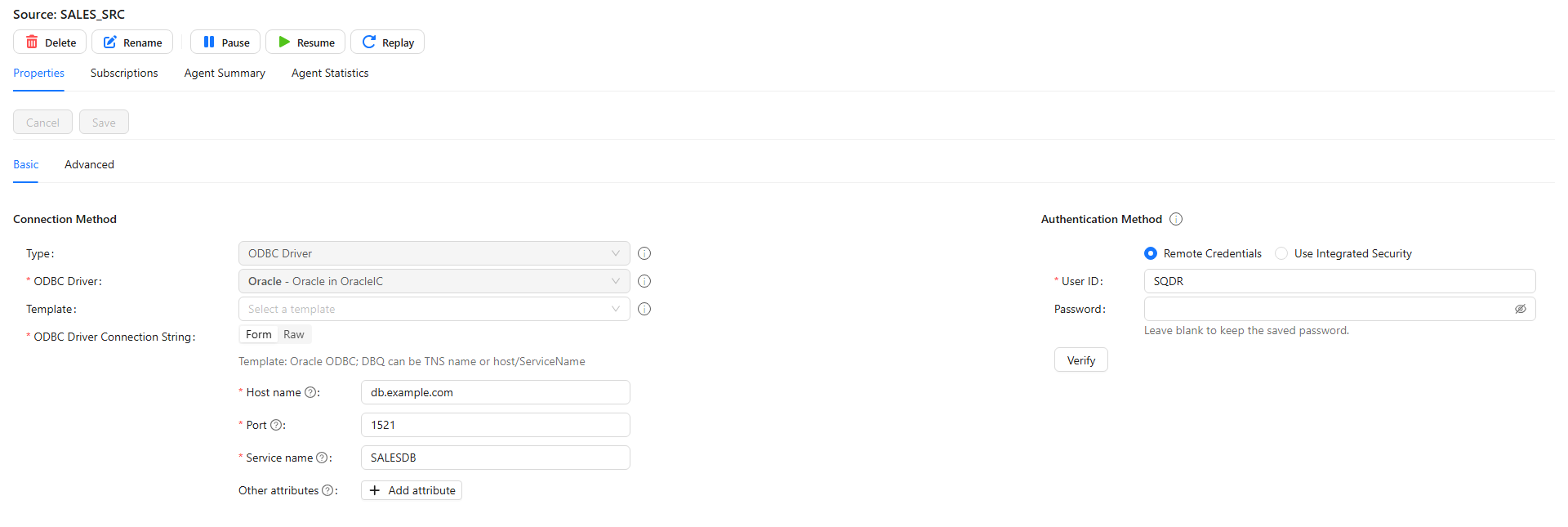
Connection Method
The connection type and the data source or driver are set when the source is created and can't be changed; to use another driver, create a new source.
| Option | What it does | Default | When to change it |
|---|---|---|---|
| ODBC Driver Connection String | Up to 4096 characters. You can refer to secrets as $$name$$. See Connection strings. |
— | — |
With Remote Credentials, changing the connection string or selecting a template clears the Password (enter it again before saving) and keeps the User ID.
Authentication Method
See also Authentication.
| Option | What it does | Default | When to change it |
|---|---|---|---|
| Authentication Method | Use Integrated Security connects as the account the Replicator Service runs under and adds Trusted_Connection=Yes to the connection string. Connection String (driver-specific) adds no login settings: the connection string or ODBC data source supplies the user and the credentials. |
Remote Credentials | Use Integrated Security for SQL Server sources with Windows authentication. Connection String (driver-specific) when the driver signs in with a key or token set in the connection string or DSN. |
| User ID | Needs permission to read the replicated objects and to run any SQL processing that subscriptions perform on the source. For a new source it's also used for the default Object Schema. | — | — |
| Password | Stored encrypted in the control database and never shown; if you don't change the field, the current password is kept. | — | — |
| Verify | Doesn't save. While the connection is the saved one, a blank Password means the saved password. See Testing the connection. | — | Before you save a changed connection. |
Advanced
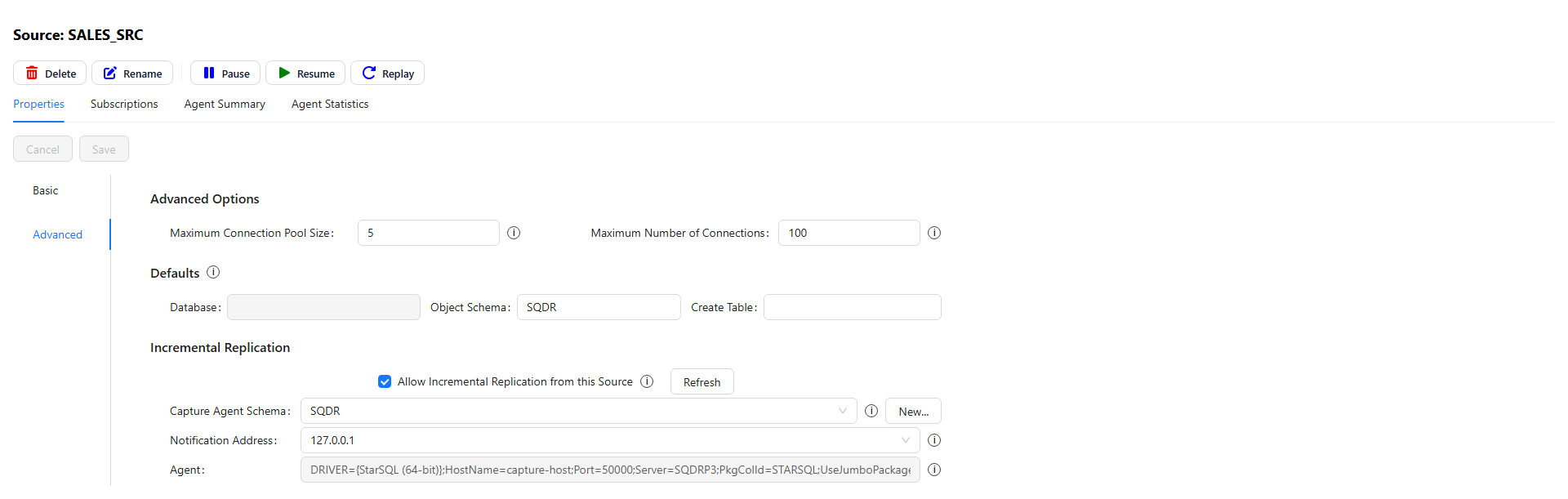
Advanced Options
| Option | What it does | Default | When to change it |
|---|---|---|---|
| Maximum Connection Pool Size | How many unused connections to the source are kept open for reuse, which saves the time to open one. Pooled connections are closed after the time limit set on the Connection Pools tab of Service settings. 0 keeps none. Must not be larger than Maximum Number of Connections. | 5 | Increase it when many replications from this source start in quick succession; decrease it to hold fewer idle sessions on the database. |
| Maximum Number of Connections | The most connections the Replicator Service opens to the source at the same time, for this source definition. When the limit is reached, further requests wait (status Waiting on the Connections tab of Monitoring; see Connections). At least 1. | 100 | Lower it to limit the load or the number of sessions on the source database, for example to stay within a license. |
| AS/400 Multi Member File Access | Db2 for i sources only: lets subscriptions replicate a specific member of a multi-member physical file. Without it, only the default member of a file is replicated. | off | To replicate individual file members. See Multimember files. |
Defaults
Defaults for new subscriptions and groups. Changing them doesn't affect existing subscriptions.
| Option | What it does | Default | When to change it |
|---|---|---|---|
| Database | The database (catalog) preselected in the Subscription Wizard's source filter, and the default source database of new incremental groups. Available only if the source database uses catalogs in table names. | the database name reported by the driver | To start new subscriptions in another database. |
| Object Schema | The schema (owner) preselected in the Subscription Wizard's source filter, and the default source schema of new incremental groups. Available only if the source database uses schemas in table names. | dbo for SQL Server; otherwise the user ID |
To start new subscriptions in the schema that holds the tables you replicate. |
| Create Table | Stored with the source; not used by the Replicator Service for sources. | empty | — |
Incremental Replication
Makes the source available for incremental replication through a Capture Agent, which must be set up for
the source database first (see Add a Capture Agent). For Db2 for i, Db2 for LUW, SQL
Server, Oracle, MySQL, Informix and PostgreSQL sources, the Replicator Service looks for Capture Agent schemas in the
source database: schemas that contain the Capture Agent's SQ_PROPERTIES table.
| Option | What it does | Default | When to change it |
|---|---|---|---|
| Allow Incremental Replication from this Source | Lets subscriptions on this source be incremental and lets incremental groups use it. When you turn it on, the first Capture Agent schema found is selected; if none is found, you're asked for one (see New Capture Agent Schema). | on if a Capture Agent schema was found when the source was created | Turn it off only if the source must no longer be used incrementally: all incremental groups using this source, and their members, are deleted when you save. |
| Capture Agent Schema | Which Capture Agent to use, by the schema of its control tables. For SQL Server it's shown as database.schema, for MySQL as the database. |
the first schema found | When several Capture Agents monitor the same database, choose the one that captures the tables you replicate. Changing it resets every incremental group that uses the source: each member needs a new baseline. |
| Notification Address | Where the Capture Agent sends change data notifications for this source. See Change data notifications. | an IP address of the Replicator Service's computer | When the Capture Agent must use another address or host name to reach the Replicator Service, or Disable to rely on polling only. |
| Agent | Read-only: the connection string the Replicator Service uses to reach the Capture Agent's staging database. The Replicator Service reads it from the Capture Agent. | — | — |
| Refresh | Existing sources: saves the source and reads the Capture Agent's connection information again, then updates Agent and the list of Capture Agent schemas. | — | After the Capture Agent's configuration changed (for example, it was moved), or to pick up a newly created Capture Agent schema. |
A reset removes the groups and members from the Capture Agent and registers them again. Selecting a schema that wasn't found at the source makes the result unpredictable for existing groups; save only if you're sure the schema is right.
If the source's Capture Agent schema can't be found in the source database, Advanced shows a warning: incremental replication from this source may not work until it's fixed.
New Capture Agent Schema
Adds a Capture Agent schema that the Replicator Service didn't detect, for example because the user ID can't see it. The schema must exist at the source for incremental replication to work.
Change data notifications
The Replicator Service learns about new changes in two ways:
- Polling: each incremental group asks the Capture Agent for changes every Poll Interval (see Group properties).
- Notifications: when changes are committed for a subscribed table, the Capture Agent sends a UDP notification to the source's Notification Address, and the groups poll right away instead of waiting for the next interval. Groups with Use Fixed Schedule ignore notifications.
You can also type the address or host name the Capture Agent must use (with Network Address Translation (NAT), the address the Capture Agent's host sees may differ from the local one). Use a static address. The port is set in SQDR Plus (2728 by default, see Ports); a firewall on the Replicator Service's computer must allow it. A changed address takes effect for the source's incremental groups right away.
Agent Summary
The status of the source's Capture Agent, read from its staging database: whether capture is running and how far it
has read, without opening SQDR Control Center. (Congested) after a status means the log reader has fallen behind the
source (see When a Capture Agent falls behind). Log Position is usually a
timestamp followed by the source's own position in parentheses. For what the components and values mean, see Summary
tab.
Agent Statistics
The Capture Agent's statistics, one row per component, statistic and hour: how much it processed and how long it took, for example to find the cause of latency.
Value is the total for the hour. For what each statistic means, see Statistics tab.