Parallel baselines with slices
A subscription (snapshot or incremental) can copy its baseline in slices. A slice is one piece of the source copy: a disjoint part of the source table, chosen by a rule on a source column, copied by its own stream into the one destination table. The subscription is baselined when every slice is copied.
The subscription's Max concurrent slices (Criteria tab) sets how many slices run in parallel: with 4 (the default), up to four at a time; with 1, one after another. Either way, a failed or canceled run resumes with the slices not yet copied instead of copying the whole table again.
Otherwise a baseline copies a table with one stream. For a very large table that also changes a lot, that can take so long that the changes captured meanwhile pile up, and the incremental subscription struggles to catch up.
When to use it
For a table whose baseline takes hours: parallel slices shorten the copy when the source and destination can take more load, and slicing alone (Max concurrent slices at 1) still lets a long baseline resume where it stopped. Leave it off for other tables: each running slice uses its own source and destination connections, and more slices help only until the source, the network or the destination becomes the bottleneck. For most tables, a normal baseline is simpler and safe.
How it works
- The run prepares the destination once, as for any baseline: it runs the before processing, creates or empties the table, and drops the indexes and keys that are rebuilt afterwards. For an incremental subscription, the Capture Agent is told once that the baseline starts.
- Each slice is copied by its own stream, with the slice's condition added to the
SELECT(with the subscription's criteria, if any). The slices append their rows to the destination table, up to Max concurrent slices at a time. - When every slice is copied, the run rebuilds the indexes and keys, runs the after processing and, for an incremental subscription, completes the baseline as usual.
The run's messages say how the table was sliced (for example "Sliced baseline: 8 slices (modulus on ORDER_ID), 4 at a time") and each slice's result. The replication events show one entry for the whole baseline; a resumed run reports the total of all its slices.
Requirements
- Destination: SQL Server, Oracle, MySQL, Db2 for LUW, Db2 for i or PostgreSQL. Other destinations, including those whose baseline an agent copies (such as Databricks), refuse the setting when the subscription is saved.
- Loader: Use native-loader function, if available or Insert using ODBC (see Baseline Replication Options); not Manual synchronization or Null synchronization - DDL Only.
- Source: any source except Salesforce. The slicing column must be a source column (not a derived column) of a number, date, time, timestamp or character type; for Modulus, a whole number.
Set up a parallel baseline
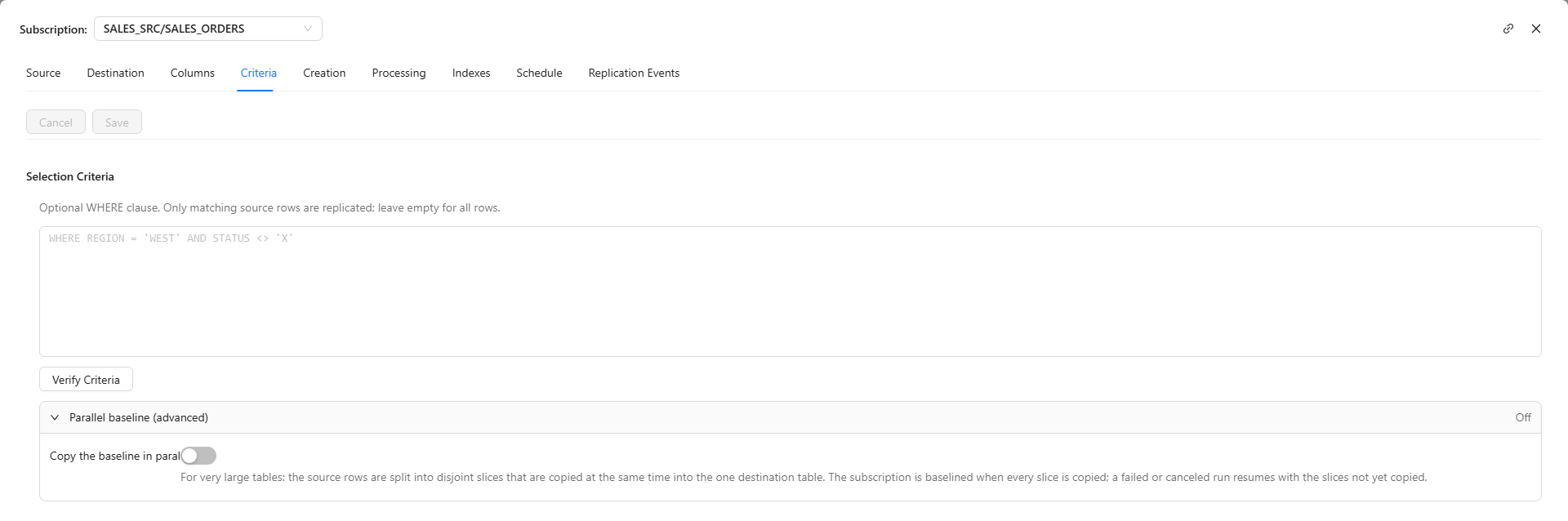
- In the subscription's properties (or the Subscription Wizard), open the Columns tab once so that the source columns are loaded, then go to the Criteria tab.
- Expand Parallel baseline (advanced) and turn on Copy the baseline in parallel slices.
- Choose how the rows are split in Slices by, and the Source column (see Choosing the slices).
- Set Max concurrent slices.
- Click Verify Slices, and change the definition until it reports no rows in no slice or in more than one.
- Save. The next baseline (a run of the subscription or its group) copies the slices.
Options
| Option | What it does | Default | When to change it |
|---|---|---|---|
| Copy the baseline in parallel slices | Turning it off and saving removes the definition. | off | |
| Slices by | See Choosing the slices. | Modulus | Pick the one that spreads the rows evenly for this table. |
| Source column | A column whose values are spread evenly and that the source can evaluate cheaply. | ||
| Modulus | Modulus only: how many slices. Each remainder of the column divided by it is one slice. | 4 | More slices for a larger table. |
| Boundaries | Range only: ascending values that each start a new slice: numbers, dates (yyyy-mm-dd) or timestamps (yyyy-mm-dd hh:mm[:ss]). |
||
| Values | Values only: one row per slice, with the column values of that slice. | ||
| Expressions | Expressions only: a condition for each slice (at least two), in the source's SQL, without WHERE. |
When no single column fits. | |
| Max concurrent slices | How many slices are copied at once, within the Replicator Service's maximum number of replication threads. In a group run, the subscription counts as one of the group's threads; its slices don't count against the group's Maximum Subscriptions. | 4 | Lower it if the source or destination is overloaded; raise it if both have room. |
| Helper column SQDR_SLICE | Shown when the slicing column isn't copied to the destination unchanged, and always for Expressions. For the baseline, a column SQDR_SLICE with each row's slice number is added to the destination table, so that a failed slice's rows can be found and deleted. Destination default drops it after the baseline, except on Db2 for LUW and Db2 for i destinations, where dropping a column leaves the table to be reorganized; Drop after the baseline and Keep decide it yourself. |
Destination default | Keep if dropping a column is costly at your destination. |
| Verify Slices | Counts each slice's rows in one scan of the source table, without locking it, so counts on a changing table are approximate. | Before every save that changes the slices. |
Choosing the slices
| Slices by | Slices | Example |
|---|---|---|
| Modulus | One per remainder of the column divided by the modulus, plus one for NULL when the column is nullable. | ORDER_ID, modulus 8: eight slices of about the same size, if the numbers are spread evenly. |
| Range | One per interval between boundaries, one for the rows below the first boundary, and one for NULL. | ORDER_DATE with the boundaries 2024-01-01, 2025-01-01 and 2026-01-01. |
| Values | One per row of values, plus an "other" slice for every value not listed, and NULL. | REGION: EAST and NORTH in one slice, WEST in another. |
| Expressions | One per condition, as written. | ORDER_ID < 5000000 and ORDER_ID >= 5000000. |
Modulus, Range and Values always cover every row exactly once. With Expressions, that's up to you: a row matching no condition isn't copied, and one matching two is copied twice. Verify Slices reports both.
The values you enter are checked against the column's type and sent to the source in a form every database accepts: you don't need the source's own date and timestamp syntax.
Running, progress and restarts
- Progress. Until a sliced baseline completes, the subscription's status on the source's Subscriptions tab and the group's Subscriptions tab shows how many slices are done, running and failed.
- A failed or canceled run keeps the slices already copied. The next run of the subscription or its group resumes: it doesn't prepare the destination or run the before processing again, deletes (in batches) the rows of slices started but not finished, and copies only the remaining slices. This works whether or not the group allows Checkpoint/Restart.
- Restart Baseline from Scratch (in the subscription's or member's ... menu) discards the copied slices, so the next run copies the whole baseline again.
- Changes that start over. Changing the slices (or turning them off), the criteria, the destination table or the destination options makes the next run start over.
- Stable key. A sliced baseline builds no key before the load: keys are built as for a subscription without Stable key.
In a group
A group's Allow Parallel (Sliced) Baselines (General tab, on by default) decides whether members with a parallel baseline copy it in slices in a group run. Clear it to copy them in one stream, for example to limit a group run's load on the source or destination. The slice definitions are kept for when you turn it on again, but an incomplete sliced baseline's slices are discarded, so its next baseline starts over; the run's messages then say "Parallel (sliced) baselines are not allowed in group ...". Runs of the subscription on its own aren't affected. See Group properties: General.
SQL Server: bulk copy and table locks
With Use native-loader function, if available to SQL Server, each slice is loaded with Bulk Copy. When the
destination table has no clustered index and no enabled index, the slices ask for a table lock (TABLOCK), which lets
SQL Server load them in parallel. With a clustered or enabled index, a table lock would make the slices load one at a
time, so they load without it. Disabled indexes don't count: with only disabled indexes, the slices take turns with the
lock, which is still faster than without it. The run's messages say which applies ("Bulk copy with the TABLOCK hint:
..." or "Bulk copy without the TABLOCK hint: ...").
For the fastest load, have the indexes dropped before the copy and created afterwards (the subscription's Indexes tab, or the group's Replicate indexes), or disabled with the group's Allow disable/enable indexes (see Group properties: General).
If a sliced baseline doesn't start
A sliced baseline fails with "The control database table of the slices' state (@ss_slice) is not available" when the Replicator Service couldn't set up the control database for parallel baselines; the service log says why. Other replication isn't affected.
On a Db2 control database, the control database user needs the REFERENCES privilege on the SUBSCRIPTION control
table: grant it, then restart the Replicator Service. For example:
GRANT REFERENCES ON SQDR.SUBSCRIPTION TO USER SQDR