Group properties
A group's properties apply to all its members: how a group run behaves and, for an incremental group, where changes come from, how often they're polled and how they're applied.
Saving changes
- Incremental groups are paused when saved. Click Resume to apply changes again.
- A running group can't be saved.
- Changing Allow Checkpoint/Restart clears the members' checkpoints.
General
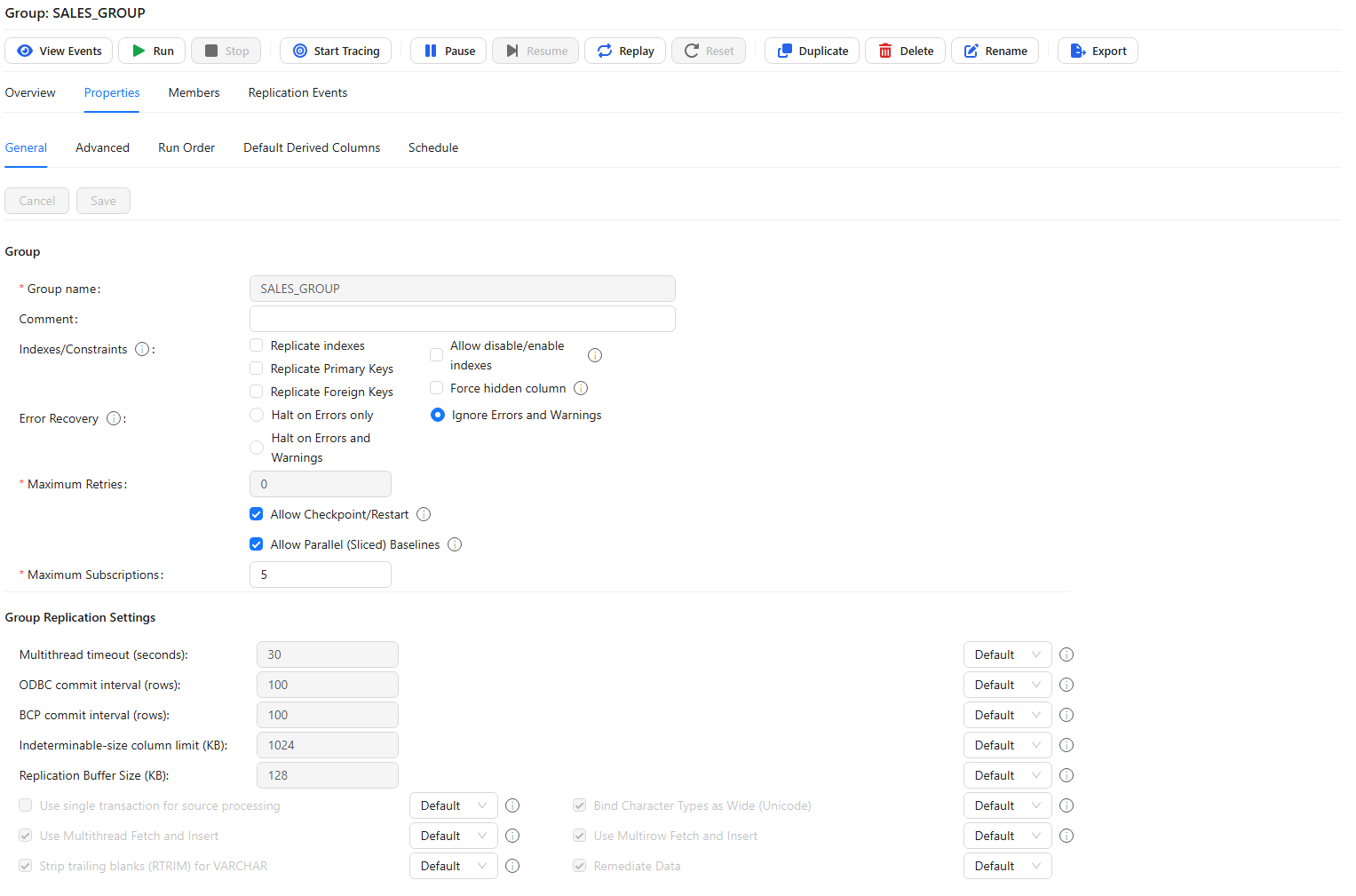
| Option | What it does | Default | When to change it |
|---|---|---|---|
| Replicate indexes, Replicate Primary Keys, Replicate Foreign Keys | Replicate the source's indexes or constraints for every member, overriding each subscription's Indexes tab. They're created during a run (for incremental members, a baseline); if source indexes change, run the member again. | off | |
| Allow disable/enable indexes | SQL Server and Oracle destinations: disables non-unique indexes before the copy and enables them afterwards, which is faster. A clustered index stays enabled. No effect for members that re-create the table on each run. The group-level version of the disableIndices service property. |
off | Large tables to SQL Server or Oracle destinations. |
| Force hidden column | Incremental groups: gives the group a default derived column @RRN, so new members get a destination column with the source's row identifier (the Relative Record Number on Db2 for i, the ROWID on Oracle), which Apply uses to find the rows it changes. Clearing it removes that default column. Existing members aren't affected. Shown only where the source's row identifier can be used. See The RRN or ROWID column. |
off | Source tables without a unique index, or with key columns (such as timestamps) that don't map exactly to the destination type. |
| Error Recovery | Whether a group run stops when a member fails or warns; see How a group run works. | Ignore Errors and Warnings | When later members depend on earlier ones. |
| Maximum Retries | Snapshot groups with Allow Checkpoint/Restart: a failed member copy is retried in the same run. See How a group run works. | 0 | To ride out short failures, such as a lost connection, on large members. |
| Allow Checkpoint/Restart | Also applies to incremental members' baselines. See Checkpoint/Restart. | on | |
| Allow Parallel (Sliced) Baselines | Members with a parallel baseline (set on their Criteria tab) copy it in slices. Clear it to copy them in one stream: their slice definitions are kept, and an incomplete sliced baseline's slices are discarded. Single-subscription runs aren't affected. See Parallel baselines. | on | To limit the load a group run puts on the source or destination. |
| Maximum Subscriptions | Members copied (baselined) at once in a group run; with Merge, also tables merged in parallel. 1 to 100. | 5 | Lower it to reduce the load; 1 copies members one at a time, in run order. |
Group Replication Settings
The Replicator Service's global replication settings, overridden for this group only. What each does and its service-wide value: Replication defaults.
Subscriptions
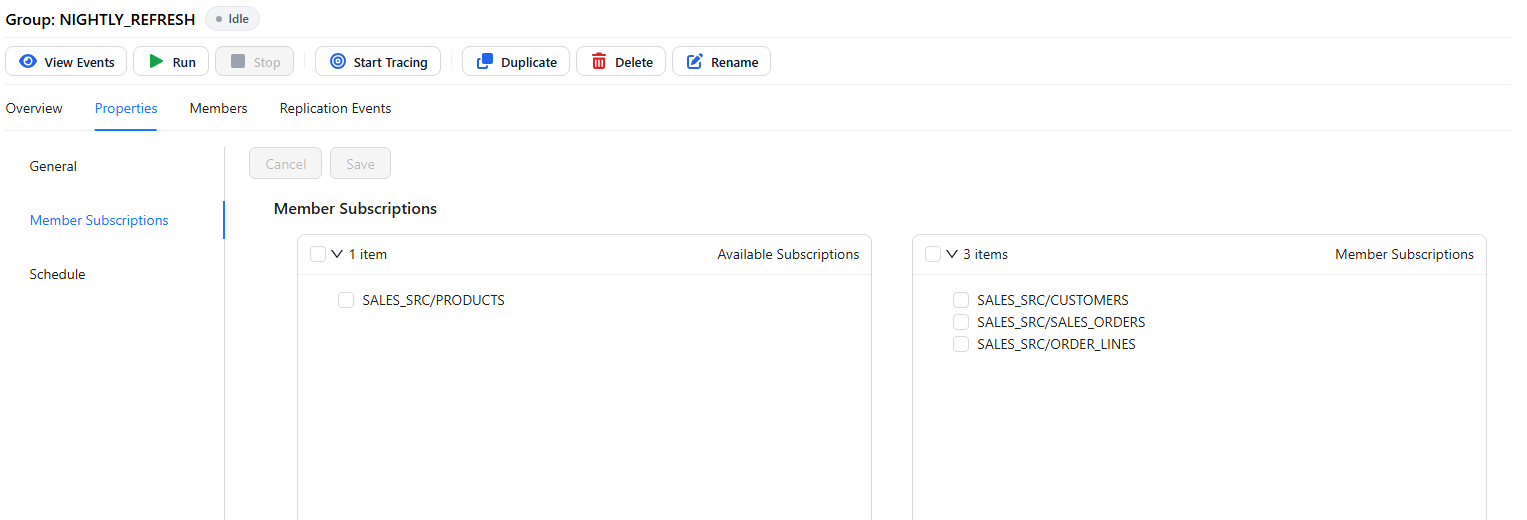
Snapshot groups only: the members and their run order (new members go at the end). A snapshot subscription can belong to several groups. See Subscriptions in a group.
Advanced
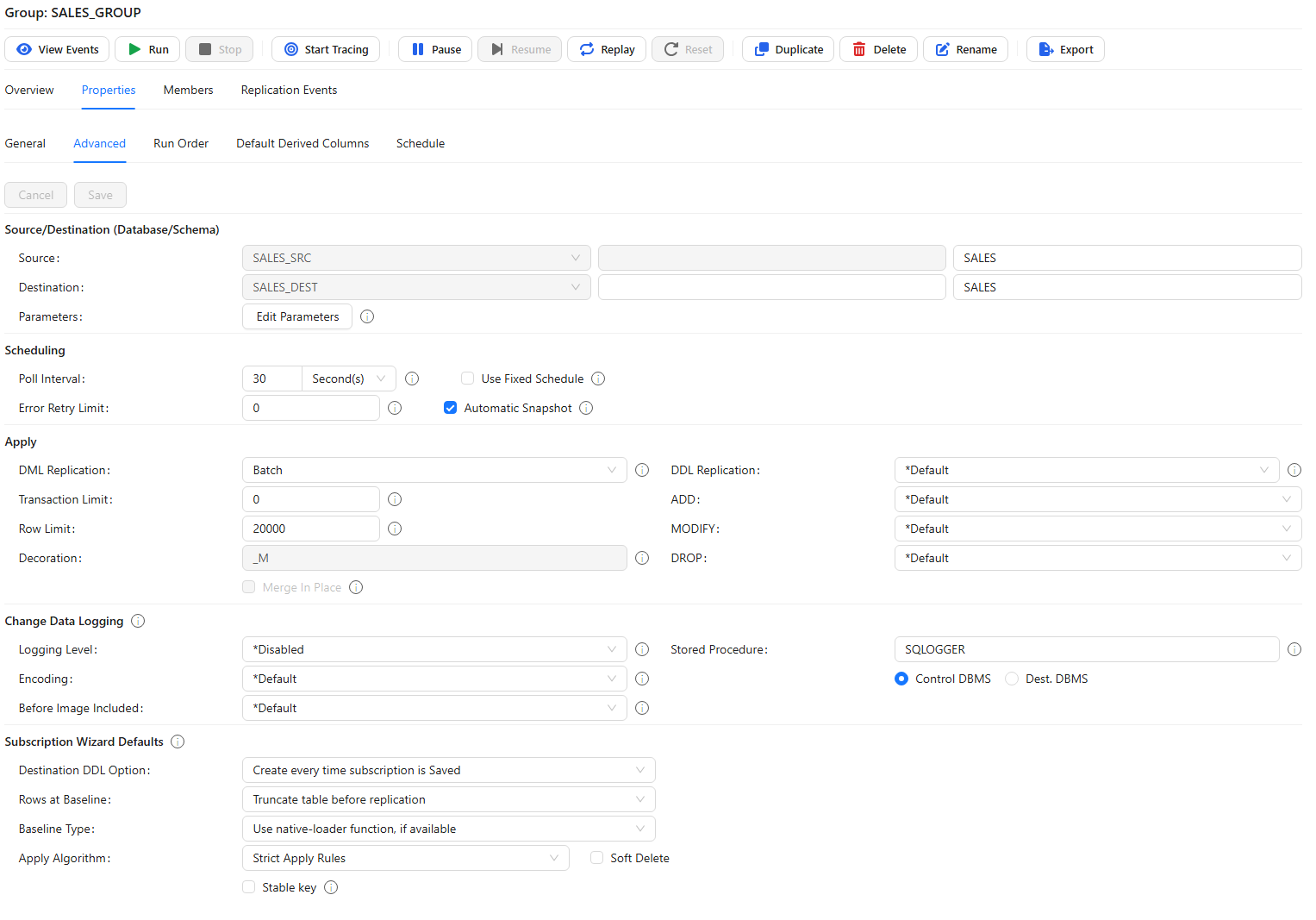
Incremental groups: where changes come from and go to, how often the group polls, and how changes are applied. For snapshot groups, see Snapshot groups: Advanced.
Source/Destination (Database/Schema)
The Source and Destination can't be changed once the group exists. The database and schema beside them are the defaults for new members.
Parameters (under the destination): the group's copy of the destination's parameters, which Stelo Capture uses for
the group's incremental members; for streaming and data sink destinations, the Apply extension's settings (for example
its className). The copy is filled in from the destination's Default
Parameters when the group is created; Load from Destination reloads
them. See Apply extensions.
Scheduling
| Option | What it does | Default | When to change it |
|---|---|---|---|
| Poll Interval | How often the group asks the Capture Agent for changes. A change data notification makes the group poll earlier. | 3 minutes | Longer to apply changes less often; to apply them only once a day, also turn on Use Fixed Schedule, or notifications keep triggering polls (see Best practices). Shorter for lower latency when notifications aren't used. |
| Use Fixed Schedule | Polls strictly every Poll Interval and ignores change data notifications. | off | When changes should arrive at predictable times rather than as soon as they're committed. |
| Error Retry Limit | How many consecutive polling errors are allowed before the Replicator Service pauses the group. 0 keeps retrying. A group paused this way resumes when the service restarts. | 0 | |
| Automatic Snapshot | Baselines members that need it (new members, or ones that must be re-baselined) automatically. If a group run failed in the last few minutes, it waits before trying again. | on | Turn it off to decide when baselines run, for example outside business hours with a Schedule. |
Apply
| Option | What it does | Default | When to change it |
|---|---|---|---|
| DML Replication | How changes are applied: Batch applies them table by table, one statement per changed row; Merge loads each table's changes into a merge table and applies them with one SQL MERGE (or the destination's equivalent), several tables in parallel; Sequence applies them row by row in their original order across tables. Destinations that use a Java apply connector always use Merge. Merge is offered only for destinations that support it, and choosing it turns Merge In Place off and change data logging to *Disabled. See Choosing the apply method. |
Batch | Merge for high volumes to destinations that support it (SQL Server, Oracle, Db2, MySQL, Informix, PostgreSQL 15 and later, Snowflake, Google BigQuery, SAP HANA, Exasol; see Destinations and methods); never for other destinations. Keep members that use Only Stream Change Data, or that rely on change data logging, in Batch groups. Sequence only when destination foreign keys require the original order. |
| Transaction Limit | The most source transactions combined into one destination transaction. 0 is unlimited; 1 applies each source transaction on its own. | 0 | See Commit limits. |
| Row Limit | About how many rows each request for changes returns (at least one transaction is always included). 0 is unlimited. | 20000 | See Commit limits. |
| Merge In Place | With Merge, builds each member's merge table as a permanent destination table, named from the destination table and the Decoration, instead of a temporary table (SQDRWT_<id>). It's emptied after each merge, or kept for inspection with the applyRetainMergeContent service property. |
off. SQL Server groups created before SQDR 7.0 have it on, unless it was cleared. | Destinations where temporary tables are a problem, or to inspect the last merge's rows. |
| Decoration | With Merge In Place (and always for Exasol), how the merge table is named from the destination table and a tag taken from the member's subscription ID: a suffix (default _M, giving for example ORDERS_1a2b3c4d_M), a prefix if it ends in _, or a schema if written as schema. |
_M |
To put merge tables in their own schema or give them a recognizable prefix. An existing table with the merge table's name is dropped. See The merge table. |
| DDL Replication, ADD, MODIFY, DROP | When and how source ALTER changes are applied to the destination: see ALTER processing. *Default uses the service's setting. |
*Default |
Commit limits
At each poll, the Replicator Service asks the Capture Agent for the staged changes and, with Batch and Sequence, applies several source transactions as one destination transaction (Merge commits each table on its own; see Choosing the apply method). That's faster, but a large batch takes longer to commit and uses more destination log space. Transaction Limit and Row Limit (above) limit the batch: a transaction is never split, so a larger one is still returned whole. Keep the defaults unless each source transaction must be applied on its own, or the destination's log space is limited.
Change Data Logging
Records the applied change data through a stored procedure, in addition to (or instead of) updating the destination tables. See Change Data Processing.
| Option | What it does | Default |
|---|---|---|
| Logging Level | What is recorded: Data-Always records every change with its keys and data; Keys-Always every change with its keys only; Errors-Only only changes that failed to apply. | *Disabled |
| Encoding | *Default uses the useXMLEncoding service property. |
*Default |
| Before Image Included | How the before image of an update is delivered: Separately as its own row, or Combined with the after image. The subscription must archive all DML activity or have a criteria (even 1=1). Available from Db2 for i (tables journaled as *BOTH), Oracle, SQL Server (Change Data Capture only), Db2 for LUW and MySQL. |
*Default |
| Stored Procedure, Control DBMS / Dest. DBMS | The procedure that records the change data, and where it runs: in the control database, or in the destination database as part of the apply transaction. | SQLOGGER, Control DBMS |
Subscription Wizard Defaults
The values a subscription created in this group starts with. They don't change existing members.
| Option | What it does |
|---|---|
| Destination DDL Option, Rows at Baseline, Baseline Type | The destination options of a new member. They apply when the member is created from the group's member list, or by the New-Subscription cmdlet without -DropType or -ReplicationType. A group created together with a subscription takes that subscription's values. The lists offer only what the group's destination accepts. |
| Apply Algorithm and Soft Delete | The apply options the Subscription Wizard proposes for new members. See Incremental apply options. |
| Stable key | New members have a stable key. |
Copy, convert and import keep each subscription's own values unless you choose others.
Snapshot groups: Advanced
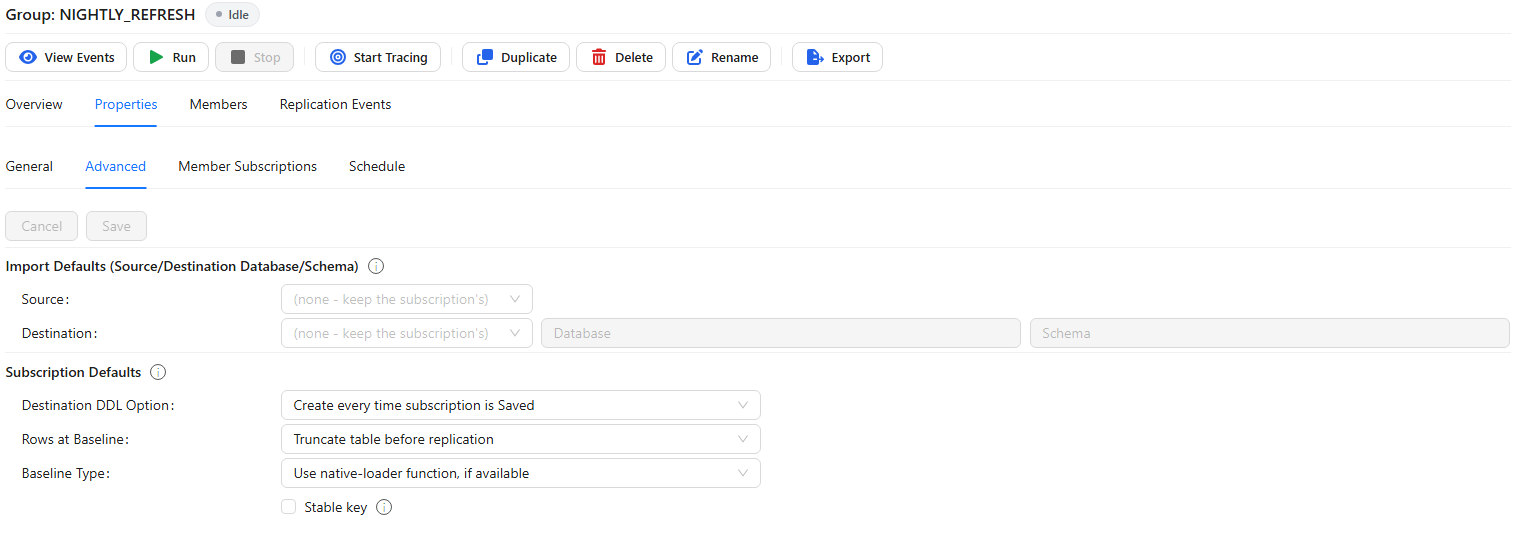
Defaults for a snapshot group's subscriptions. A new snapshot group needs a default Source and Destination, a Destination DDL Option and a Baseline Type; otherwise the save is refused ("The new snapshot group '...' needs its defaults for the subscriptions created in it").
| Card | What it does |
|---|---|
| Import Defaults (Source/Destination Database/Schema) | The Source and the Destination (with its database and schema) given to subscriptions imported into the group with Import Subscriptions. See Export and import. |
| Subscription Defaults | Destination DDL Option, Rows at Baseline, Baseline Type and Stable key for a subscription created in the group without these values, for example by the New-Subscription cmdlet. A group created together with a subscription takes that subscription's values. |
Run Order
Incremental groups only, once the group exists: the order in which members are baselined during a group run. Depending on Maximum Subscriptions, members can finish in another order; set it to 1 if they must finish in this order.
Default Derived Columns
Incremental groups only: derived columns added to every new member, for example capture
metadata such as @TS and @TYPE for all tables. Existing members aren't changed. See
Default derived columns for a group, including Import and Export.
Schedule
For an incremental group, a scheduled run baselines the members that need it; it doesn't change how often the group polls. See Scheduling.