Destinations
A destination is a database or platform the Replicator Service writes to: how to connect to it, the user to write with, and the defaults for new subscriptions. Subscriptions and incremental groups each write to one destination. You create a destination with the New Destination wizard. To change, pause, replay or delete one, see Manage destinations.
Before you start
Prepare the database or platform: see its page under Databases.
ODBC and Java connectors
The type of destination decides how the Replicator Service writes to it:
| Connector | Destinations | How data is written |
|---|---|---|
| ODBC | SQL Server, Oracle, Db2, MySQL, PostgreSQL, Informix, Redshift and the other ODBC databases | The Replicator Service writes snapshots, baselines and changes through the database's ODBC driver. |
| Java | Snowflake, Databricks, BigQuery, Microsoft Fabric, Kafka, S3 Tables | Data is streamed to the platform by an Apply extension for that platform. |
What a Java connector destination means for you:
- The source needs a Capture Agent, even for snapshot subscriptions: snapshots and baselines are streamed through it too. Without one, the subscription saves with a warning and its runs fail.
- Its settings are parameters, such as the Kafka topic or the cloud account: the destination's Default Parameters, copied by each new incremental group.
- Subscriptions load with the Automatic loader rather than the native loader or ODBC inserts (see Baseline Replication Options).
- Snowflake, Databricks and BigQuery connect through the platform's ODBC driver, like an ODBC destination. Microsoft Fabric, Kafka and S3 Tables have no ODBC driver: you describe the platform with parameters instead (Step 2: Connector). Their subscriptions can't use an existing destination table, and their column types are the platform's (see Data type mapping).
Defining a database more than once
Define the same database again when sets of subscriptions need a different user (with its own permissions and default schema) or connection limits.
To send the same data to several databases of the same kind, consider replicating to one of them and distributing it with that database's own replication: every subscription reads the source separately and adds load on it.
Create a destination
- In the menu bar, click Destinations, then New. From the Subscription Wizard's Destination step, click New....
- Name the destination and choose its type (Step 1).
- Describe the connection:
- Most destinations: choose the ODBC driver and enter the connection string (Step 2), then the user to write with, and click Verify (Step 3).
- Microsoft Fabric, Kafka and S3 Tables: enter the platform's parameters (Step 2: Connector).
- Click Save. The Replicator Service fills in the other settings (see After you save). To review them first, tick Advanced before saving and go through the Options and Default steps.
The New Destination wizard, step by step
Step 1: Name
Name the destination and choose its type.
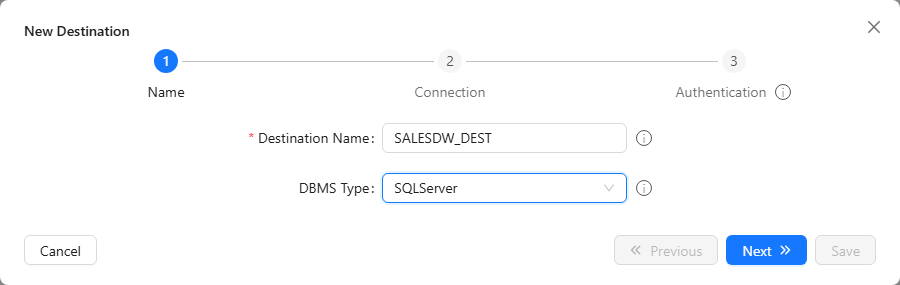
The name can have up to 32 characters, and you can change it later. DBMS Type decides the connector, and narrows the next step's driver list to the drivers with a connection template for it. For an ODBC database that isn't listed, leave Other: the Replicator Service detects the type when you save.
Step 2: Connection
Tell the Replicator Service how to reach the database.
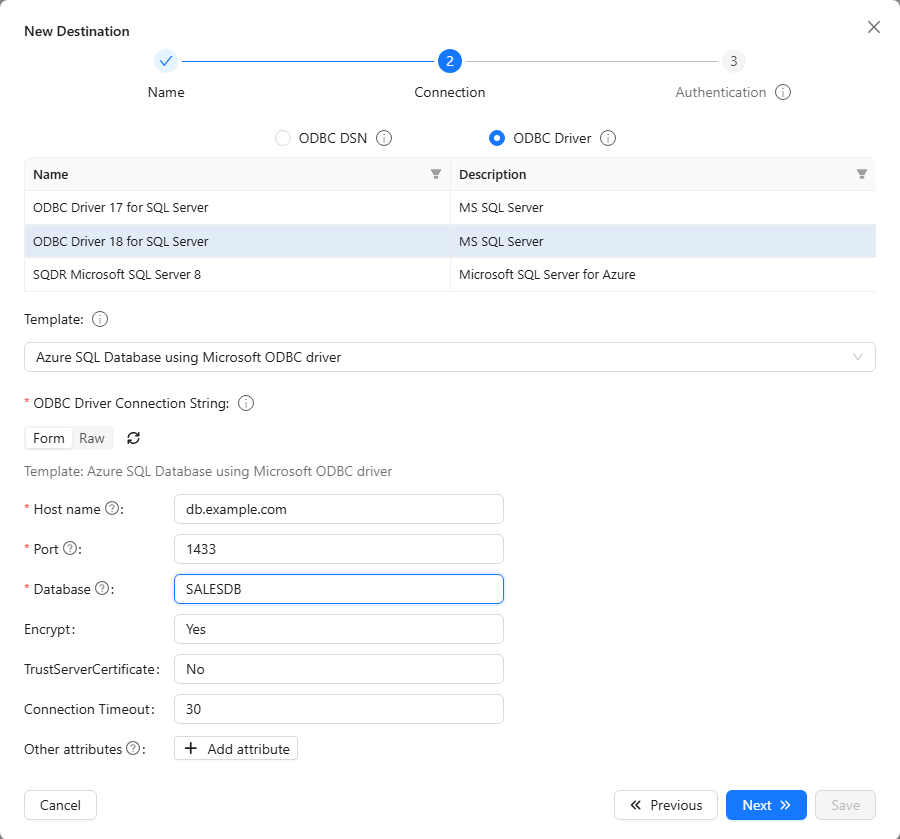
- ODBC Driver or ODBC DSN. With ODBC Driver, you enter the connection string here and there's no data source to maintain on the Stelo VM. Choose ODBC DSN only to use a data source already defined in the ODBC Data Source Administrator. You can't switch between them later.
- Template. Pick the template for your setup to get one field per setting. It also sets the destination's defaults for that database. Other attributes adds settings the template doesn't have.
- Passwords and keys in the connection string can be stored secrets, written
$$name$$.
What to enter for your destination, with examples: Connection strings by database.
Step 3: Authentication
Enter the database user the Replicator Service writes with.
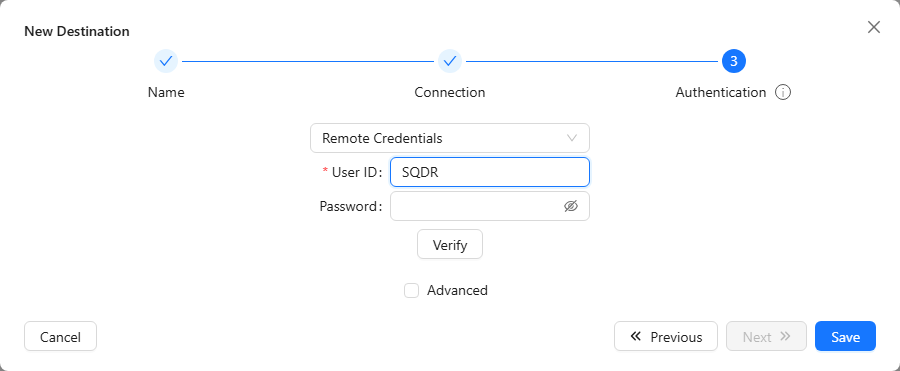
The user owns the tables that subscriptions create, so it needs permission to create, change and fill them. Some
platforms use a special user (for example token for Databricks): see the destination's page. Instead of a user and
password, choose Use Integrated Security (SQL Server with Windows authentication), or Connection String
(driver-specific) when the connection string holds the login, such as a Snowflake key pair or a BigQuery key file
(see Authentication).
Click Verify to test the connection before you save (see Testing the connection). Tick Advanced to review the connection limits and defaults before saving.
Step 2: Connector (Microsoft Fabric, Kafka, S3 Tables)
Describe the platform the Apply extension writes to.
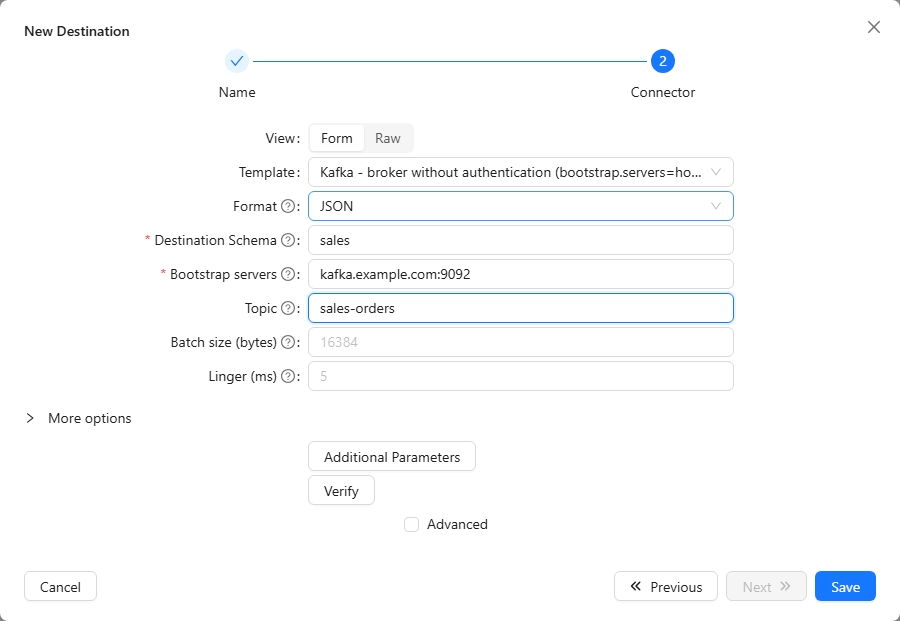
Pick the Template for your setup, for example a Kafka broker without authentication, Azure Event Hubs, Kafka with an API key and secret (such as Confluent Cloud), or a Fabric OneLake landing zone with a service principal. Then fill in its parameters: hover a parameter's help icon for what it means. For Kafka, Format is the message format (JSON, classic JSON or XML). Destination Schema is the default schema for the destination tables (the namespace for S3 Tables).
Passwords and keys can be stored secrets ($$name$$). Verify checks the parameters with Stelo
Capture before you save. What each parameter means: Microsoft Fabric,
Kafka.
Amazon S3 Tables has no template: save the destination, then enter its parameters as Default Parameters.
Step 4: Options (with Advanced)
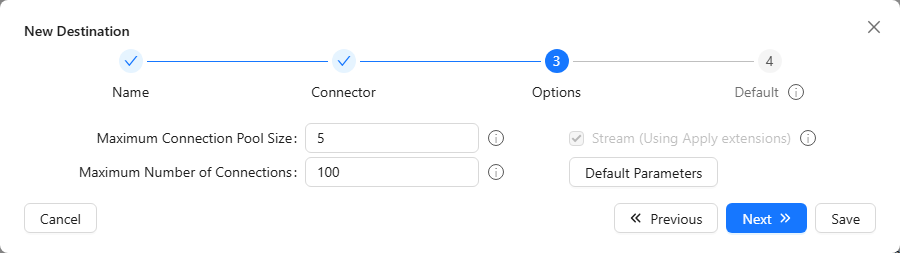
Limit the connections the Replicator Service opens to the destination. (Step 3 for Microsoft Fabric, Kafka and S3 Tables.)
| Option | When to change it |
|---|---|
| Maximum Connection Pool Size (default 5) | Raise it when many replications to this destination start in quick succession, to reuse open connections. |
| Maximum Number of Connections (default 100) | Lower it to limit the sessions on the destination. |
| Default Parameters | Java connector destinations: to change the Apply extension's parameters. See Default Parameters. |
Step 5: Default (with Advanced)
Choose where new destination tables are created. (Step 4 for Microsoft Fabric, Kafka and S3 Tables.)
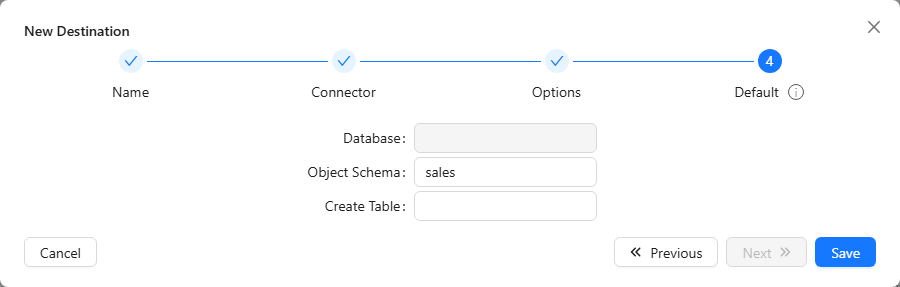
Object Schema (and Database, if the destination has catalogs) is where the Subscription Wizard proposes to
create destination tables, and the destination schema of new incremental groups. Create Table adds a clause to
every CREATE TABLE for this destination, for example a tablespace. See Defaults.
After you save
Without Advanced, the Replicator Service connects to the destination and sets its type (if you left Other), its default database and schema, and the connection limits, as for a source (see After you save). For BigQuery and Databricks, it also suggests the Default Parameters. If it can't connect, nothing is saved. Microsoft Fabric, Kafka and S3 Tables destinations are saved without connecting.
If the destination reports a different type from the one you chose, the reported type is saved and you're told.
Next steps
- Create an incremental group or a snapshot group, then its subscriptions.
- Manage destinations: change, rename, pause, replay or delete a destination.
- Destination properties: change a destination's settings.
- Destination data type differs from the source