Startup mode
Normally a Capture Agent starts where it stopped, trusting its saved log position, staging tables and subscriptions. After a fail-over, a restore or a similar event they may no longer match the source or the destinations. The startup mode then tells the agent, for its next start only, to recover its position, take every subscription offline, or start every subscription again with a new baseline. After that start, it goes back to Normal.
Which mode to use
- Fail-over and fall-back. When the source database moves to a backup system, or back to the primary, and the agent's control and staging tables were carried over (for example restored from a backup), use Warm (restored): capture continues without new baselines.
- The destinations can't be trusted any more. When the control tables are intact but the source and destination tables are out of step, use Force New Baselines (baselines start by themselves) or Force Offline (you decide when each subscription comes back online).
- Otherwise leave it at Normal. A non-Normal startup is logged as SEVERE, with
Non-standard startup due to configured startup mode=mode.
Set the startup mode
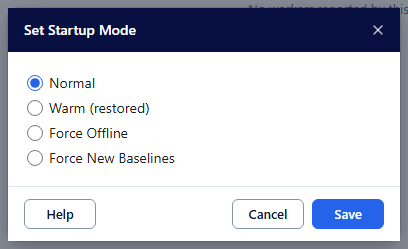
- Stop the agent.
- Click Startup Mode in the agent's header, choose the mode and save.
- Start the agent.
The dialog always opens with Normal selected, whatever mode is stored: saving with Normal clears a mode set earlier.
To start a Db2 for i or MySQL agent (MySQL, MariaDB or Aurora MySQL) from a point in the log you choose, keep Normal and use Set Journal Position... / Set Log Position... (see Read the log again from an earlier point).
What each mode does
With any mode other than Normal, the agent at startup:
- discards its saved log position for the source database;
- marks the transactions that were in progress as rolled back;
- restores journaling or logging on the subscribed tables, if needed (for Db2 for i, only when
autoJournalis on).
Then, depending on the mode:
| Mode | What else happens | After the startup |
|---|---|---|
| Normal | Nothing: the agent uses its saved position and tables as they are. | — |
| Warm (restored) | For each online subscription, the agent compares its staging table with the source table: if the table changed, a new staging table is created; if it no longer exists, SQDR is notified that it was dropped. | Replication continues. |
| Force Offline | Every subscription is taken offline. | Take subscriptions online yourself when the tables are ready (see Take subscriptions offline and online); each needs a new baseline. |
| Force New Baselines | Every subscription is taken offline, the agent skips the log records it hasn't read yet, and the subscriptions are brought online again as the agent starts. | SQDR runs a new baseline for each subscription. |