Db2 for i as a source
A Db2 for i Capture Agent reads the journals of an IBM i system and stages the changes to the tables you replicate. You create it with Add Capture Agent in the SQDR Control Center (database type IBM iSeries). For the steps every source shares, see Add a Capture Agent; to replicate to Db2 for i, see Set up a Db2 for i destination.
Supported configurations
| Supported | |
|---|---|
| IBM i releases | V5R4 or later. See Requirements. |
| Cloud services | IBM i in a cloud (such as IBM Power Virtual Server) isn't listed in the requirements: ask Stelo Support. |
| Remote journals | Journal by journal, the agent can read from a remote journal on another IBM i instead of the local journal: type 1 or type 2, synchronous or asynchronous, broadcast or cascade. See Local or remote journal and Remote journals. |
| Independent ASPs (IASPs) | Tables on an IASP need extra setup (see Tables on an independent ASP). Journal them yourself: autojournaling hasn't been verified with IASPs. |
| High availability (HA) | Stelo Capture runs alongside HA products such as MIMIX and iCluster, reading the journals only with standard IBM i commands and APIs. The agent reads the system its host name points to. For a planned role swap, see High availability and role swaps. Tables journaled with after images only can be replicated only by their relative record number (see Before and after images). |
| Agent sign-in | IBM i user profiles: the agent connects as the agent user (no special authority); a privileged owner owns the journal-reading programs; an installing user with security officer authority is needed only to create the agent. See Users and authority. |
| Encryption | Optional TLS for the agent's connections, including the journal entries it reads (Use SSL/TLS). See SSL/TLS to a Db2 for i source. |
| SQDR (Replicator Service) | Connects with StarSQL (installed and licensed with SQDR), the IBM i Access ODBC Driver or the IBM Db2 ODBC driver (Db2 Connect). See Create the SQDR source. |
| Schema changes | Supported (ALTER processing). An ALTER renumbers the table's rows, as a reorganization (RGZPFM) does, so members keyed by the RRN need a new baseline after either. |
| Tables | Each replicated table must be journaled, with before and after images (*BOTH) unless the subscription is keyed by the relative record number (RRN). A table without a primary key or unique index is keyed by its RRN, or by columns you list in SQ_IXLIST. For members other than a file's first, see Multimember files. |
How capture works
The Capture Agent writes an entry to the table's journal to mark where a baseline starts. A worker of the agent reads
each journal that holds subscribed tables. On the IBM i, a Stelo Capture program in the agent's control library
retrieves the entries of subscribed tables (filterAtSource) into a user space; the agent reads the user space through
the IBM i file server and writes the changes to its staging database. When a read doesn't fill the user space, the
worker waits pollSleepTime (5 seconds) before the next one. An update is staged with its before image unless the
subscription is keyed by the RRN. The Stelo Capture exit program keeps IBM i from deleting journal receivers the agent
hasn't read (see Keep the source's journals and logs in check).
Load on the IBM i. The size of the database matters only for the baselines, which read each table once. After that, the load comes from the volume of changes: the agent only reads the journal entries of subscribed tables.
Local or remote journal
| Local journal | Remote journal | |
|---|---|---|
| What the agent reads | The journal on the IBM i that holds the tables (the primary system). | A remote journal on another IBM i, to which IBM i remote journaling copies the local journal's entries. |
| How you set it up | Nothing beyond journaling the tables: the default. | Remote journaling set up and active on both systems, then a mapping per journal on the agent's Remote Journals tab; unmapped journals are still read locally. See Remote journals. |
| What it needs on the IBM i | The host servers on the primary system (see Host servers and ports). | Also: an RDB directory entry and server authentication entry for the remote system, a user on the remote system that can create a library and a user profile and restore the Stelo Capture programs, and the host servers there. |
| What stays on the primary system | Everything. | The agent stays connected to it and manages the subscriptions and journaling there; the Replicator Service takes the baselines from the source tables there. |
| How long the changes are kept | The journal's receivers on the primary system: the exit program keeps those the agent hasn't read, so they accumulate while the agent is stopped. | The remote journal's receivers on the remote system: the agent keeps its reading position up to date there, for the exit program on that system (see Keep the source's journals and logs in check). |
| Load on the primary system | The jobs that retrieve the journal entries and send them to the agent. | IBM i sends each entry to the remote journal; the jobs that retrieve and send entries to the agent run on the remote system. |
| Worker on the Summary tab | Named after the journal. | Named after the journal, with @host. |
| Choose it when | The default. | To take journal reading and its network traffic off the production system, for example when remote journaling already feeds a backup or disaster recovery system. |
Before and after images (BOTH or AFTER)
A table is journaled with after images only (IMAGES(*AFTER)) or with before and after images (IMAGES(*BOTH)),
which decides how it can be replicated:
*BOTH |
*AFTER |
|
|---|---|---|
| What the journal holds for an update | The row before the change (entry UB) and after it (entry UP). |
The row after the change only. |
| Subscriptions | Any key: primary key, unique index, SQ_IXLIST or RRN. Incremental subscriptions can have criteria (see Use constant criteria). | Only subscriptions keyed by the RRN (see The RRN or ROWID column). Any other subscription fails with "Invalid journaling/logging options", unless the agent's relaxedJournalCheck is true (an advanced setting: ask Stelo Support). Incremental subscriptions can't have criteria: criteria need *BOTH. |
Reorganizations and ALTER |
A subscription keyed by its columns isn't affected. | Each reorganization or ALTER of the table gives its rows new RRNs, so its members need a new baseline. |
| Journal size | Larger: an extra entry for each update. | Smaller. |
| Choose it when | The default and recommended: the agent journals the tables it starts journaling with *BOTH. |
The journaling can't be changed (for example another product set it up), and RRN keys and baselines after reorganizations are acceptable. |
To journal a table with both images, use CHGJRNOBJ (it needs an *EXCLRD lock on the table):
CHGJRNOBJ OBJ((MYLIB/MYTABLE *FILE)) ATR(*IMAGES) IMAGES(*BOTH)
To check how a table is journaled, see Journaling.
Minimized journal entries. A journal created with MINENTDTA(*FILE) or MINENTDTA(*DTAARA) can't be read:
subscribing fails with "Journaled for Minimized Journal Entries, but not on Field Boundaries. Not supported." With
MINENTDTA(*FLDBDY), key the subscriptions by the RRN and avoid criteria. WRKJRNA or DSPJRN shows the journal's
setting; MINENTDTA(*NONE) (the default) needs nothing.
Before you start
- License: without a CO license, the agent may use 2 processor cores (see License).
- Network: the Stelo VM and the Replicator Service can reach the IBM i's ports (see Ports).
- IBM i release: see Supported source databases.
- The IBM i administrator has prepared the system (see Prepare the database), and you have the installing user's credentials for step 1 of the wizard.
Prepare the database
An IBM i security administrator does these steps once per system, before you add the agent.
Users and authority
The wizard asks for three IBM i users, and SQDR needs a fourth (see below the table):
| User | Used for | Created by the wizard |
|---|---|---|
| Installing user (step 1 Userid) | Only while you create the agent (and for Update Host): creates the other two users and the control library, and restores the Stelo Capture programs. Needs *SECOFR authority, or *SECADM and *ALLOBJ. Stelo Capture doesn't store its password. |
No |
| Agent user (named like the Control Schema) | The user the Capture Agent connects as. It owns the control library and its contents, and needs no special authority. | Yes, if it doesn't exist |
| Privileged owner | Owns the programs that read journal entries on the agent's behalf (they run with their owner's authority). | Yes, if it doesn't exist |
SQDR (the Replicator Service) connects to the IBM i with its own user, for example SQDRUSER, which you enter when you
create the SQDR source. Create it with no special authority, and give it *USE authority on the files
to replicate and *EXECUTE on their libraries, so that it can read them for baselines and snapshots (for example
GRTOBJAUT OBJ(MYLIB/*ALL) OBJTYPE(*FILE) USER(SQDRUSER) AUT(*USE) and GRTOBJAUT OBJ(MYLIB) OBJTYPE(*LIB)
USER(SQDRUSER) AUT(*EXECUTE)). It needs no grant on the agent's control tables (see What SQDR's user
needs).
Pick the names (the defaults are QSECOFR, SQDR and, for example, SQDRADM) and the passwords of the two users
the wizard creates. To create them yourself instead, see Create the users yourself.
What the IBM i administrator hands over. Whoever adds the Capture Agent and creates the SQDR source needs:
- For the wizard: the IBM i host name; the installing user (with
*SECOFR, or*SECADMand*ALLOBJ) and its password; the names and passwords of the agent user and the privileged owner (or of the users you created yourself). - For the SQDR source: SQDR's user profile (for example
SQDRUSER) and its password.
Allow the Stelo Capture programs to be restored
The wizard copies the Stelo Capture programs to the IBM i as a save file and restores them into the control library. The
journal-reading programs adopt their owner's authority, and the system value QALWOBJRST decides whether such
programs can be restored. Check it:
DSPSYSVAL SYSVAL(QALWOBJRST)
It must be *ALL (the default) or include *ALWPGMADP. Otherwise the restore fails, and the wizard stops with an
error about a later step (for example an object that isn't found), not about the restore. Update Host and setting
up a remote journal on another IBM i restore the programs too, so the value must allow
it then as well.
File server access for the agent user
The agent reads journal entries from a user space in its control library through the IBM i file server (the
QSYS.LIB file system). For users without *ALLOBJ, the authorization list QPWFSERVER controls that access. Check
it:
DSPAUTL AUTL(QPWFSERVER)
If *PUBLIC has *EXCLUDE instead of the default *USE, give the agent user *USE once the wizard has created it
(or create the user first):
ADDAUTLE AUTL(QPWFSERVER) USER(SQDR) AUT(*USE)
Journaling
Every table you replicate must be journaled, with before and after images (IMAGES(*BOTH)): the agent reads its
changes from the journal. By default the agent starts journaling a table when you subscribe to it (see
Autojournaling). To journal tables yourself, or check how a table is journaled, see
Journaling.
A table journaled with after images only (*AFTER) can be replicated only by its relative record number: see
Before and after images to change it.
Host servers and ports
The Capture Agent connects through the IBM i host servers (server mapper, database, file, remote command and sign-on
servers); the Replicator Service connects with DRDA (the DDM server) or through the host servers, depending on its
ODBC driver. Start them, for example with STRHOSTSVR SERVER(*ALL) and STRTCPSVR SERVER(*DDM), and let their ports
through the firewall (see Ports). For TLS or a remote journal,
see TLS and remote journals.
Columns without a CCSID
Older databases often have character columns tagged CCSID 65535 (FOR BIT DATA), which SQDR replicate
as binary data. To find them:
SELECT table_name, column_name, data_type, length
  FROM qsys2.syscolumns
 WHERE table_schema = 'MYLIB'
   AND ccsid = 65535;
If they hold text, plan to set the CCSID to read them in (for example 37) before the first baseline: the agent property
binaryCCSID once the agent exists, and BinaryCCSID=37 (StarSQL) or
TRANSLATE=1 (IBM i Access ODBC driver) in the source's connection string. Changing an incremental source's connection
string later resets its incremental groups (see Saving changes).
Tables on an independent ASP (IASP)
If the tables you replicate are on an IASP: name the IASP as the initial ASP group in the agent user's job
description, and journal the tables yourself (autojournaling hasn't been verified with IASPs). After you add the
agent, its sourceDbUrl property adds database name= and the IASP name, and the SQDR source's connection string
names the IASP. The agent's control library stays in the system ASP. For the steps, see
Tables on an independent ASP.
TLS and remote journals
Two optional setups on the IBM i, before you add the agent:
- TLS: set up TLS on the IBM i (see Set up TLS on the IBM i) and keep the certificate of the certificate authority (CA) that issued the IBM i's certificate: the Stelo Capture administrator adds it to Stelo Capture before running the wizard (see Use SSL/TLS in Add the Capture Agent).
- Remote journals: to read the changes from a remote journal on another IBM i, see Set up remote journaling on the IBM i.
Create the users yourself
If your security policy doesn't allow an installing user with *SECOFR authority or a privileged owner with
*ALLOBJ, the IBM i administrator creates the users, the control library and the grants beforehand, with the SQDR
Plus CL setup programs (SQDRINST) or with CL commands. See Create the IBM i users yourself.
What SQDR's user needs
Besides *USE on the files and *EXECUTE on their libraries (see Users and authority), SQDR's user
reads the agent's control tables. The agent grants SELECT on them to PUBLIC when it creates them (property
grantees), so no grant is needed unless you changed grantees or the control library's public authority. The StarSQL
packages the wizard binds in the control library are granted to PUBLIC too.
Add the Capture Agent
In the SQDR Control Center, click Add Capture Agent and choose IBM iSeries.
Step 1: Database
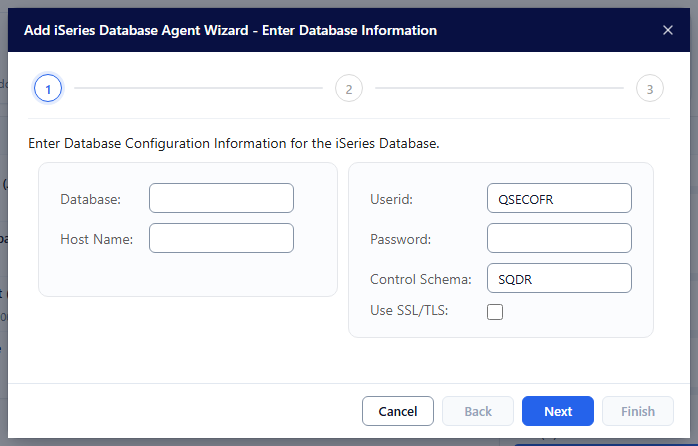
| Option | What it does | Default | When to change it |
|---|---|---|---|
| Database | The relational database (RDB) name of the IBM i system: on the IBM i, WRKRDBDIRE shows it as the entry whose remote location is *LOCAL. Converted to upper case. |
— | — |
| Userid | The installing user (see Users and authority). | QSECOFR | When you use another user with the required authority. |
| Control Schema | The library (collection) on the IBM i that holds the agent's control tables and programs, and the name of the agent user. Converted to upper case. | SQDR | When another Stelo Capture system already uses SQDR on this IBM i, or you add a second agent for it. |
| Use SSL/TLS | Also for reading journal entries (property useSSL). First set up TLS on the IBM i (see Set up TLS on the IBM i) and add the certificate of the CA that issued its certificate on the SQDR Control Center's Certificates tab (see The Certificates tab): the wizard and the agent check the IBM i's certificate against it. |
cleared | When the connection to the IBM i must be encrypted. |
Next connects to the IBM i as the installing user and checks the control library. It doesn't change the IBM i: the wizard does that only at Finish (see What the wizard does on the IBM i). If the library holds an SQDR Plus v3 agent, the wizard offers to manage that agent remotely (see An existing agent in the control schema).
Step 2: Control Database and Agent Authentication
| Option | What it does | Default | When to change it |
|---|---|---|---|
| Control Database | The agent's staging database on the Stelo VM. See Step 2: Control DB. | <New Control DB> | To share a staging database with other agents. |
| Agent Password | Its current password if the user exists (the wizard checks it by connecting), otherwise the password it's created with. | — | — |
| Privileged Owner | Owns the journal-reading programs. If it doesn't exist, it's created as a security administrator (user class *SECADM, special authorities *ALLOBJ and *SECADM). |
— | — |
| Privileged Password | If the user exists, its current password. | — | — |
Step 3: Logging
The defaults send no email; Finish on step 2 keeps them. See Step 3: Logging.
The agent is created Stopped. Do the steps in After you add the agent, then start it (see Check that capture is running).
What the wizard does on the IBM i
As the installing user, the wizard:
- Creates the agent user if it doesn't exist, with initial menu
*SIGNOFF, limited capabilities (LMTCPB(*YES)) and a password that doesn't expire. An existing agent user is only checked. - Creates the privileged owner the same way if it doesn't exist, as a security administrator (see Privileged Owner in step 2).
- Creates the control library with
CREATE COLLECTIONif it doesn't exist, and sets its journalQSQJRNto system-managed receivers that are deleted when no longer needed. - Copies the Stelo Capture host programs to the IBM i (save file
SQDRPin the control library) and restores them into the control library, unless they're already current. The privileged owner owns the journal-reading service programs, the agent user the other objects.*PUBLICgets*USEauthority to the library. - Registers the agent with journal management and automatic journaling turned on (properties
managedLogsandautoJournal, see Autojournaling and Keep the source's journals and logs in check). The agent connects as the agent user. - Binds the StarSQL packages the Replicator Service uses, in the control library, and grants their use to
*PUBLIC(see Create the SQDR source).
The Launch Agent then registers the agent (see Finish the wizard).
After you add the agent
- QPWFSERVER. If
*PUBLICis excluded from theQPWFSERVERauthorization list, give the agent user access now (see File server access for the agent user). - Columns without a CCSID. Set binaryCCSID if you need it (see Columns without a CCSID).
For remote journals, multi-member files, tables without keys and upgrades, see Later setup.
Later setup
- Remote journals. To read from a remote journal on another IBM i, see Remote journals.
- Upgrades. After you upgrade Stelo Capture, update the programs on the IBM i with Update Host (see Update Host).
- Multi-member files and tables without keys. See Multimember files and Primary keys with SQ_IXLIST.
Check that capture is running
- Select the agent in the tree and click Start/Restart (see Start the agent).
- On the agent's Summary tab, the agent is Running.
- If not, the agent's Diagnostics tab shows why.
- On the IBM i, check that the agent registered its exit program: run
WRKREGINFand type 8 next to exit pointQIBM_QJO_DLT_JRNRCV(formatDRCV0100); programCADLTRCVin the agent's library (for exampleSQDR) should be listed.WRKOBJLCK OBJ(SQDR) OBJTYPE(*USRPRF)lists the jobs running as the agent user; twoQZRCSRVSjobs inMSGWstatus are normal: they wait on the agent's message queues (see Jobs and connections).
After the first baseline
After you create the SQDR source, add tables to an incremental group and run its first baseline, check:
- If a subscribed table isn't captured, the agent's Diagnostics tab shows why, for example "File Not Journaled" or "Invalid journaling/logging options" (see Journaling).
- On the agent's Summary tab, there's one worker per journal, named after the journal
(with
@hostfor a remote journal); it shows no error, and its log position (journal receiver and sequence number) moves forward as the tables change. - The agent's Subscriptions tab lists them, and the source's Agent Summary tab in the Data Replicator Manager shows the agent's status.
- On the IBM i,
WRKJRNA JRN(MYLIB/MYJRN)and F19 list the tables journaled to a worker's journal, andDSPJRN JRN(MYLIB/MYJRN) FILE((MYLIB/MYTABLE))shows a table's latest journal entries, whose sequence numbers you can compare with the worker's log position. - For a remote journal,
WRKJRNAon the primary system and F16 show whether the remote journal is active (see Remote journals).
Create the SQDR source
In the Data Replicator Manager, create a source for the same IBM i, with the
DBMS Type iSeries:
- Connection: StarSQL, the IBM i Access ODBC Driver or the IBM Db2 ODBC driver, with a connection string from the
driver's template (see Connection string). Keep
IsolationLevel=2(StarSQL) orCommitMode=1(IBM i Access) for incremental replication. With StarSQL, setPkgColIDto the agent's control library (SQDRin the template): the wizard bound the StarSQL packages there. For TLS, see SQDR connections; for columns tagged CCSID 65535, see Columns without a CCSID. For tables on an IASP, the connection string names the IASP (see IBM i Access ODBC driver). - Login: Remote Credentials with SQDR's own IBM i user profile (see Users and authority),
separate from the agent's users:
*USEauthority to the files and*EXECUTEto their libraries. It also reads the agent's control tables. - Incremental replication: when the Replicator Service finds the agent's control library on the IBM i, the source allows incremental replication from it: check that Capture Agent Schema is that library (see Incremental Replication).
Then set up the destination, following its page under Destinations: it says when to create the incremental group (for Databricks, once the Spark connector runs).
Connection string
StarSQL
- Template:
HostName=myhostip;Port=446;Server=MYRDB;IsolationLevel=2;PkgColID=SQDR.Serveris the relational database name (RDB;WRKRDBDIREshows the local one). KeepIsolationLevel=2for sources used for incremental replication. PkgColIDnames the collection (on Db2 for i, the library) that holds the StarSQL packages.- SSL/TLS (Windows): add
Netlib=SQSSL.DLLand use the server's SSL port, for exampleHostName=myhostip;Netlib=SQSSL.DLL;Port=448;Server=MYRDB;IsolationLevel=2;PkgColID=SQDR.
Docker
Put the certificate authority's certificate in /var/sqdr/certs (see
ODBC drivers in the container). The Replicator Service adds
ICONV4UTF8=Y to StarSQL connection strings on Linux.
The Add Capture Agent wizard bound the StarSQL packages in the agent's control library: set PkgColID to it
(SQDR in the template). To bind them in another library, see Bind the StarSQL
packages.
IBM i Access ODBC Driver
- Template:
System=mysystem;CommitMode=1;DefaultLibraries={QGPL,SQDR}.Systemis the IBM i's host name. KeepCommitMode=1(*CS) for sources used for incremental replication.DefaultLibrariesis optional. - Independent ASP (IASP): add
Database=with the database name (RDB entry) of the IASP, for exampleSystem=mysystem;CommitMode=1;DefaultLibraries={QGPL,SQDR};Database=IASP1. - The driver doesn't use StarSQL packages.
IBM Db2 ODBC driver
- Template:
Hostname=myhostip;Port=446;Database=MYRDB;Protocol=TCPIP;LongDataCompat=1;Authentication=SERVER.Databaseis the RDB name on Db2 for i, the database name on Db2 for LUW and the location name on Db2 for z/OS. UseAuthentication=ENCRYPTto encrypt the user ID and password. - LOB columns:
LongDataCompat=1is required to replicate LOB data correctly. For large LOB values, also set the driver'sLOBMaxColumnSizeand the service's Indeterminable-size column limit to the largest size you replicate. - SSL/TLS: add
Security=SSL, the server's SSL port, and the GSKit key database and stash file:SSLClientKeystoredb=C:\mySSLdir\mykeystore.kdb;SSLClientKeystash=C:\mySSLdir\mykeystore.sth. The account the Replicator Service runs as must be able to read the stash file. This driver uses its own key database, not the certificates in/var/sqdr/certsin the container. - The driver doesn't use StarSQL packages.
High availability and role swaps
Stelo Capture works alongside IBM i high availability (HA) products such as MIMIX and iCluster: it reads the journals
only with standard IBM i commands and APIs, and the agent reads the system its host name points to. Use a DNS name for
the IBM i in the agent and the SQDR source, so that a switch needs no configuration change; with IP addresses, update
the agent's sourceDbUrl and sourceDbHost and the source's connection string after the switch.
Both systems need the agent's control library with the Stelo Capture programs, ideally at the same version, the agent's users with the same passwords, and the exit program (see Keep the source's journals and logs in check).
For a planned role swap, follow The same data on a new system, with these Db2 for i steps:
- Before the switch, with no changes made to the source tables, copy the agent's
SQ_IXLISTtable (see Primary keys with SQ_IXLIST) from the system you leave to the system you switch to, for example with a snapshot subscription. The key definitions then match, and no subscription is flagged as altered. - After the switch, check from the Stelo VM that the host name resolves to the new system (for example with
jping, see "Connection refused"). If the programs on the new system are older than Stelo Capture, run Update Host before you start the agent. -
Once the switch is final, on the system you left, and only there, delete the agent's reading positions, so that its exit program stops keeping journal receivers for the agent (here with the control library
SQDR):DELETE FROM SQDR.SQ_READERS;
If the agent can't find a journal after the switch, see "Object MYJRN in library MYLIB not found" after a role swap.
Settings
These properties on the agent's Configuration tab are specific to Db2 for i (see Db2 for i properties for all of them, and Properties by source database):
| Property | What it does | Default |
|---|---|---|
autoJournal |
Starts journaling a table that isn't journaled when you subscribe to it. See Autojournaling. | true (set by the wizard) |
managedLogs |
The exit program keeps the receivers of your own journals that the agent still needs. See Keep the source's journals and logs in check. | true (set by the wizard) |
filterAtSource |
Filters journal entries on the IBM i, so that only those of subscribed tables are sent to the agent. Works for journals with up to 300 subscribed tables (see Performance). | true |
filterJobName, filterProgramName, filterUserId |
Ignore changes made by these jobs, programs or user, for example the user a Replicator Service applies changes with in two-way replication. | — |
pollSleepTime |
How long a worker waits between reads of its journal when the last read didn't fill the user space, in milliseconds. | 5000 |
minimizeLatency |
true reads the journal again right away instead of waiting pollSleepTime. Uses more CPU on the IBM i. |
false |
userSpaceSize |
The size of the user space the agent reads journal entries into, in bytes. | 16000000 |
alwaysUseRowId |
Ignores the tables' key columns and identifies every row by its RRN. Only for an agent whose tables are all journaled *AFTER. |
false |
relaxedJournalCheck |
Accepts subscriptions that need before images on tables journaled *AFTER. Advanced: ask Stelo Support. |
false |
multiMember |
Captures every member of multi-member files. See Multimember files. | true |
binaryCCSID |
Reads character columns tagged CCSID 65535 as text in this CCSID; 65535 keeps them binary. See Columns without a CCSID. | 65535 |
useSSL |
Connects to the IBM i with TLS. Set by the wizard's Use SSL/TLS. | false |
Resource use on the IBM i
SQDR runs on another server and reaches the IBM i only through its TCP/IP host servers. The size of the database matters only for baselines; after that, the load comes from the volume of changes in the journals the agent reads.
Host servers, ports and jobs
| Server | Port (TLS port) | IBM i job | Used by |
|---|---|---|---|
| DDM/DRDA | 446 (448) | QRWTSRVR (with QSQSRVR) |
The Replicator Service with StarSQL or the IBM Db2 ODBC driver: subscriptions and baselines. |
Server mapper (as-svrmap) |
449 | — | Clients of the host servers, to look up their ports. |
Database (as-database) |
8471 (9471) | QZDASOINIT (with QSQSRVR) |
The Capture Agent (subscriptions, control tables), and the Replicator Service with the IBM i Access ODBC driver. |
File (as-file) |
8473 (9473) | QPWFSERVSO |
The Capture Agent: reads journal entries from its user spaces, and uploads the save file of Stelo Capture programs for Update Host. |
Remote command (as-rmtcmd) |
8475 (9475) | QZRCSRVS |
The Capture Agent: calls the Stelo Capture program that retrieves journal entries, and reads its message queues. |
Sign-on (as-signon) |
8476 (9476) | — | Sign-on of the Capture Agent's connections. |
Central (as-central) |
8470 (9470) | — | The Capture Agent's connections (IBM Toolbox for Java). |
For the firewall, see Ports.
Jobs and connections
- Journal reading: one file server connection per journal, for each agent, and a remote command job that runs the Stelo Capture program retrieving the journal's entries.
- Message queues: two more
QZRCSRVSjobs per agent wait on the message queues in the control library:CALOGQ, which carries messages from Stelo Capture programs on the IBM i to the agent's log, andCAQ, which takes commands for the agent (see Pause capture during host maintenance). They check for messages every 10 seconds, so they showMSGWstatus most of the time: that's normal. - Whose jobs: the host server jobs are prestart jobs of user
QUSER; their current user is the agent user (for exampleSQDR) or SQDR's user, which tells them apart from other applications' jobs. To run them in a subsystem of their own, see Run the Stelo Capture jobs in their own subsystem. - Subscribing reads the system catalogs for the table's columns and journal, as
DSPFDandDSPFFDwould. If the table isn't journaled, starting journaling needs an exclusive lock on it for a second or two: the only exclusive lock Stelo Capture takes. Publishing a table retries it until it succeeds. - Baselines: the Replicator Service reads the table with a
SELECT. - IFS: SQDR uses no IFS shares; the Capture Agent reaches the
QSYS.LIBfile system through the file server (see File server access for the agent user).
Storage
The control library takes about 25 MB when the agent is created: control tables, the message queues CALOGQ and CAQ,
the Stelo Capture programs and service programs, the exit program, and a message file. The agent adds a user space for
each journal it reads, 16 MB by default (property userSpaceSize). Journal receivers the agent hasn't read yet are
kept by the exit program, so they accumulate while the agent is stopped (see
Keep the source's journals and logs in check).
Performance
filterAtSource. By default, the IBM i sends the agent only the journal entries of subscribed tables. That saves network traffic for some CPU on the IBM i, and the filters are set up each time a journal's worker starts. The filter holds up to 300 tables per journal: with more subscribed tables in one journal, every entry of that journal is sent and the agent filters them. To keep filtering, split the tables between agents with fewer than 300 tables each in that journal. If you replicate all or nearly all tables of a journal, or the connection to the IBM i is unreliable, setfilterAtSourcetofalse.- Journal caching. With journal caching (IBM i option 42, HA Journal Performance), IBM i holds journal entries in
memory before writing them, for up to the cache wait time, and the agent sees changes that much later. If latency
matters, turn caching off for the journals the agent reads (
CHGJRN JRN(MYLIB/MYJRN) JRNCACHE(*NO)), or shorten the cache wait time (CACHEWAITofCHGJRNA). - Latency against CPU.
minimizeLatencyandpollSleepTime(see Settings) trade CPU on the IBM i for latency.
Data types
The Replicator Service maps Db2 for i types to the destination's types as described in Data type mapping. Specific to Db2 for i:
- CCSID 65535. Character columns tagged CCSID 65535 (
FOR BIT DATA) are replicated as binary data unless you set a CCSID for them in the agent and in the SQDR source (see Columns without a CCSID). - DATALINK columns without a CCSID are read with the CCSID in
datalinkccsid(37 by default). - Invalid packed or zoned decimal data is staged as 0 and logged at level FINE; with
flagInvalidDecimalData=truethe agent fails on it instead. - The RRN. The Replicator Service can add a table's relative record number as a destination column and use it as the key (see RRN and ROWID columns).
- LOB columns aren't staged: the Replicator Service reads their values from the source table when it applies a change (see LOB and long columns).
Limitations
- Journaling. Every replicated table must be journaled; a table journaled
*AFTERcan be replicated only by subscriptions keyed by the RRN. See Before and after images. - RRN keys. Members keyed by the RRN need a new baseline after the table is reorganized or altered. See How capture works.
- Journal receivers. If a receiver the agent hasn't read is deleted (for example with
managedLogs=false, or without the exit program), every table journaled to that journal needs a new baseline. See Keep the source's journals and logs in check. - Remote journals. The agent stays connected to the primary system, and each local journal can be mapped to one remote journal. See Local or remote journal.
- IASPs need extra setup, and autojournaling hasn't been verified with them. See Tables on an independent ASP.
- Minimized journal entries. Journals with
MINENTDTA(*FILE)orMINENTDTA(*DTAARA)aren't supported; withMINENTDTA(*FLDBDY), use RRN keys. See Before and after images. - Source filtering.
filterAtSourcefilters only journals with up to 300 subscribed tables. See Performance. - Role swaps. No changes may be made to the tables between the quiesce and the agent's restart on the new system. See The same data on a new system.
- One control library per agent. A second agent for the same IBM i needs another Control Schema (see Step 1: Database).
Troubleshooting
Problems and messages, with their causes and fixes, are in Troubleshooting › Db2 for i.