ALTER processing (schema changes)
When a source table's structure changes (a column added, dropped or modified with ALTER TABLE), the destination table
must change too, or replication fails. These schema changes are also called schema drift or DDL changes.
ALTER processing makes the Replicator Service apply the same change to the destination table without a new
baseline, so replication keeps running as the source schema evolves. The Stelo Capture staging tables are adjusted
automatically.
How it works
- The Capture Agent detects the
ALTERand reports it. The member is flagged as altered (the group shows Warning of a potential problem). - Depending on DDL Replication, the Replicator Service handles the change right away (Automatic) or the next time you run the group or subscription (On Demand).
- For each added, dropped or modified column, it does what ADD, DROP or MODIFY say: change the destination table (Perform) or leave it (Ignore). Then the member goes on applying changes.
The result appears in the member's replication events, for example "DDL replicated successfully ... 1 ALTER TABLE statement(s) generated for destination."
DDL status (hammer icon)
A hammer icon next to the status icon of a member (group's Subscriptions tab) or subscription (source's Subscriptions tab) shows where its schema changes stand. In replication events, a DDL run shows the hammer instead of the result icon.
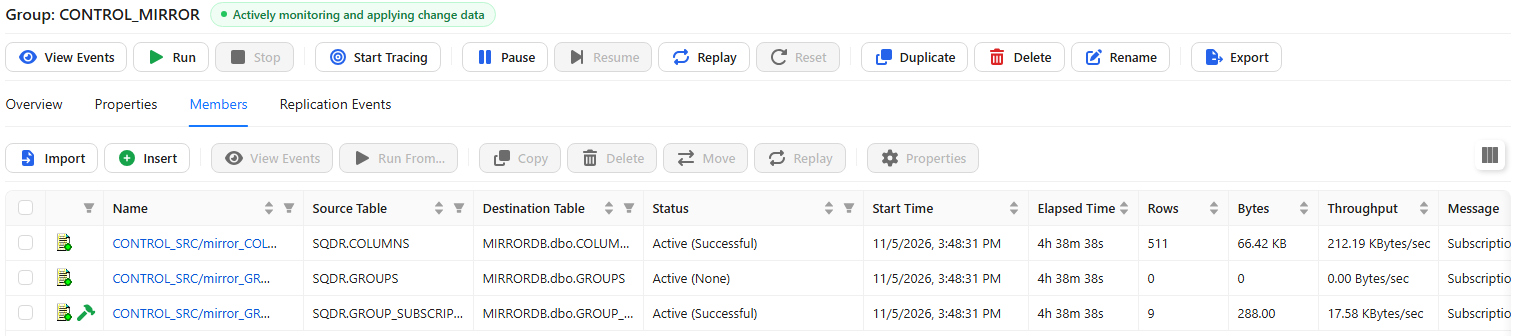
| Icon | Text | What it means |
|---|---|---|
| Grey hammer with a clock | DDL pending: the source table was altered - a DDL run is required | The change is waiting for a DDL run: with On Demand, run the group or subscription. |
| Green hammer with a clock | DDL applied - copying values into the added columns is pending | The ALTER is done; the Copy of the added columns (see below) is still to run. |
| Green hammer | DDL run succeeded | |
| Amber hammer | DDL run completed with warnings | Read the run's messages in its replication events. |
| Red hammer | DDL run failed | Read the run's messages; fix the cause and run again. |
No hammer means no DDL activity.
Settings
Per incremental group, on the Advanced tab under Apply. *Default uses the Replicator Service's setting.

| Setting | Values | Default (service) |
|---|---|---|
| DDL Replication | On Demand: the change is applied when you run the group or subscription. Automatic: the change is applied as soon as it's detected. Off: no ALTER processing; an altered member needs a new baseline. | On Demand |
| ADD | Perform: add the column to the destination table, as nullable; existing rows have no value in it until the next baseline. Copy: add the column and fill it in for the existing rows from the source table (see below). Ignore: leave the destination unchanged. | Ignore |
| DROP | Perform: drop the column from the destination table. Ignore: keep the column and its data, and make it nullable if it isn't. | Ignore |
| MODIFY (change of type, precision, scale or nullability) | Perform: change the destination column. Ignore: leave it unchanged; replication may then fail, for example with truncation errors. | Ignore |
Dropping or modifying a column that isn't replicated has no effect.
With On Demand, you can review the change first: click Merge With Source on the subscription's Columns tab, then run the subscription or group.
With Automatic, the service doesn't retry within about 6 minutes of a failed attempt, and the group must be polling (not paused).
ADD Copy. After adding the columns, the run reads the member's key and the added columns from the source table (under the subscription's criteria) into a work table at the destination, and updates the matching destination rows from it, in chunks; it doesn't insert or delete rows. With Allow Checkpoint/Restart on the group, an interrupted copy resumes after its last committed chunk; otherwise it starts over. The next DDL run completes an unfinished copy. Destinations without an ODBC catalog (Fabric, Kafka, S3 Tables) and members without a usable key get a plain ADD, with a warning.
Limitations
- ALTER processing is supported for Db2 for i, Oracle, Db2 for LUW and MySQL sources. For other sources (such as SQL Server and Informix), an altered table needs a new baseline; with Automatic Snapshot on, the group runs it itself.
- Only adding, dropping and modifying columns is handled. Changes to keys (primary key, foreign key, unique
constraint) flag the member as needing a baseline. Column positions (such as
ADD COLUMN BEFOREon Db2 for i orADD COLUMN FIRST/AFTERon MySQL) aren't reproduced. - Db2 for i: an ALTER renumbers the rows. The table is copied without its deleted rows, so the relative record numbers change, as after a reorganization. Members that hold the RRN in a destination column are marked as needing a baseline (members that archive or only stream changes aren't), and ADD Copy isn't done for them: the baseline fills in the added columns. See The RRN or ROWID column.
- Not done for members with Use existing table for baseline or Create if does not exist, else use existing.
- Some destinations don't support every change; for example, Db2 for z/OS can't make an existing column non-nullable, so that change is skipped (the run succeeds, with 0 statements generated).
- Added and modified columns are mapped with the service's current Subscription Wizard mapping settings, as for a new subscription; customized mappings of those columns are lost.
Destination notes
Db2 for i. On releases older than IBM i 7.4 TR1 and 7.3 TR7, DROP COLUMN fails with "Reason code 10" unless
the system reply list answers the inquiry message. Add this entry (check with WRKRPYLE):
ADDRPYLE SEQNBR(1500) MSGID(CPA32B2) RPY(I)
Db2 for LUW. After altering the table, the service reorganizes it (REORG TABLE ... USE TEMPSPACE1). The REORG
appears in the statistics; in cascaded replication, it affects the replications downstream.