Informix as a source
An Informix Capture Agent reads the changes through the Informix Change Data Capture (CDC) API and stages them. You create it with the Add Capture Agent wizard in the SQDR Control Center, choosing Informix as the database type. For the steps every source database shares, see Add a Capture Agent. To replicate to Informix, see Informix under Other destinations.
Supported configurations
| Supported | |
|---|---|
| Informix versions | Informix 11.50 or later. See Requirements. |
| Cloud services | Managed Informix services aren't listed in the requirements: ask Stelo Support. |
| High-availability clusters (HDR, RSS, SDS) | Not described in the manual or the requirements: ask Stelo Support. |
| Database logging | Buffered, unbuffered or ANSI logging; not a database without logging. See Logging. |
| Agent sign-in | An operating system user on the database server: the instance owner informix, or a user named like the agent's control schema (sqdr), with DBA authority on syscdcv1. See Users and privileges. |
| Encryption | The wizard has no encryption option for Informix: ask Stelo Support. |
| SQDR (Replicator Service) | Connects with the SQDR bundled Informix driver, the IBM Informix ODBC driver, or the IBM Db2 ODBC driver (DRDA port). See Create the SQDR source. |
| Schema changes | Not supported (ALTER processing), and while full-row logging is on, Informix doesn't let you alter or drop the table. To change a replicated table, delete its subscriptions first: the agent turns full-row logging off the next time it prunes. Then subscribe to the table again; it gets a new baseline. |
| Tables | A primary key or unique index on each replicated table. One agent per database. See Tables. |
How capture works
The agent opens a CDC session on the server's syscdcv1 database. When you subscribe to a table, it turns on full-row
logging for it, so that the logical log holds whole rows, and starts capture for it. Informix then sends the agent the
table's changes from the logical log: inserts, deletes, the before and after images of updates, truncates, and each
transaction's begin, commit and rollback, up to ifxReadSize (50) records at a time. When there are none, the agent
waits pollSleepTime (5 seconds). After a restart it reads on from its saved position, or from the start of the oldest
transaction still open when it stopped.
Before you start
- Stelo Capture is installed and licensed, and you can sign in to the SQDR Control Center (see Add a Capture Agent and License).
- The database runs a supported version of Informix (see Supported source databases).
- The network lets the Stelo VM and the Replicator Service reach the Informix server's port, typically 9088 (see Ports).
- The Informix administrator has prepared the server (see Prepare the database). The wizard doesn't check the Informix setup: a missing step shows up when the agent starts or when you subscribe to a table.
Prepare the database
The Informix administrator does these steps once, before you add the agent, as user informix. The examples use the
database mydatabase.
Logging
The CDC API reads the changes from the logical log, so the database must use logging (buffered, unbuffered or ANSI).
To check, query sysmaster (OpenAdmin Tool (OAT) also shows it, under SQL Toolbox > Databases):
SELECT name, is_logging, is_buff_log, is_ansi FROM sysdatabases WHERE name = 'mydatabase';
To turn logging on, use ontape: Informix changes a database's logging mode only together with a level-0 backup,
which this command takes. For example, for unbuffered logging:
ontape -s -L 0 -U mydatabase
Logical log space
Give the server enough logical-log space for the changes made over the longest time an agent may be stopped or behind (see Keeping the logical log for the agent).
The syscdcv1 database
The CDC API's functions and tables are in the syscdcv1 database, which the agent connects to. If it doesn't exist
yet, create it as user informix with the script that comes with Informix:
dbaccess - $INFORMIXDIR/etc/syscdcv1.sql
On a Windows server, open a command window for the instance as user informix (for example, Shift+right-click the
instance's shortcut, such as ol_informix1210, and choose Run as different user), then:
cd /d %INFORMIXDIR%\etc
dbaccess - syscdcv1.sql
Users and privileges
Informix authenticates users through the database server's operating system, so the agent's user is an operating
system user there: the instance owner (informix) or a user named like the agent's control schema, sqdr by default
(lower case on Linux and UNIX; see The agent user's name).
- Create the operating system user
sqdron the database server. -
As user
informix, connect tosyscdcv1and grant DBA authority (only a DBA ofsyscdcv1can use the CDC API):GRANT DBA TO sqdr; -
As user
informix, connect to the database whose tables you replicate and grantCONNECT,RESOURCE(to create the control tables) andSELECTon the tables:GRANT CONNECT TO sqdr; GRANT RESOURCE TO sqdr; GRANT SELECT ON mytable TO sqdr;
The replication user (the source's user in the Data Replicator Manager) needs CONNECT and SELECT on the tables you
replicate. The agent grants SELECT on its control tables to PUBLIC (property
grantees).
Tables
- Keys: each table needs a primary key or a unique index, so that SQDR can apply updates and deletes (see Keys, RRN/ROWID and indexes).
- Full-row logging, one agent per database: see How the agent uses your tables.
Network and drivers
- Open the Informix server's
onsoctcplistener port, typically 9088, to the Stelo VM and the Replicator Service. The Replicator Service uses the DRDA listener port (typically 9089) only with the IBM Db2 ODBC driver. See Ports. - Nothing is installed on the database server: the agent uses the Informix JDBC driver included in Stelo Capture. For the Replicator Service's drivers, see Create the SQDR source.
Keeping the logical log for the agent
Informix reuses its logical-log files in a cycle. If it reuses a file before the agent has read it, the agent loses its position and its subscriptions need a new baseline; the server's message log shows "CDC: Log Reader: ERROR: could not get logid", followed by "CDC: A capture session ended abnormally". Give the server enough logical-log space for the changes made over the longest time an agent may be stopped or behind.
- Check:
onstat -llists the logical-log files and their status. - Larger files: the
LOGSIZEconfiguration parameter sets the size of new logical-log files, in KB, for exampleonmode -wf LOGSIZE=1048576;LOGFILESsets their number. - More files:
onparams -a -d <dbspace>adds a logical-log file to a dbspace and updates theONCONFIGfile (-ssets its size in KB; without it, the size is theLOGSIZEthe server's disk space was initialized with). In OAT: Space Administration > Recovery Logs, Admin tab, Add Logical Log (dbspace, size in KB and number of logs). - More room for the dbspace: if the logical-log dbspace is full, add a storage pool directory, for example
EXECUTE FUNCTION ADMIN ('storagepool add', 'D:\storage', '0K', '0', '50000K', '2');, or mark its chunk expandable in OAT, and extend the dbspace. - Free used files: Informix reuses a logical-log file only after it's backed up.
ontape -abacks up the full logical-log files, after the agent has read them. If you back them up only so that they can be reused,LTAPEDEVin theONCONFIGfile can name a null device (NULon Windows,/dev/nullon Linux and UNIX); you then can't use the logical logs for recovery.
The agent user's name
The agent creates its control tables with the control schema as owner, and Informix lets only a DBA create tables for another user. A user whose name isn't the control schema's, without DBA authority on the database, fails with "Only a DBA can create, drop, grant, or revoke for another user."
How the agent uses your tables
- Full-row logging: when you subscribe to a table, the agent turns on full-row logging for it in
syscdcv1. While it's on, Informix doesn't let you alter or drop the table. When you delete the subscription, the agent turns it off the next time it prunes its staging tables. - One agent per database: Informix table names must be unique in a database, so a second agent's control tables would clash with the first's. Each database of an instance can have its own agent.
Add the Capture Agent
In the SQDR Control Center, click Add Capture Agent and choose Informix. The wizard doesn't change the Informix server.
Step 1: Database
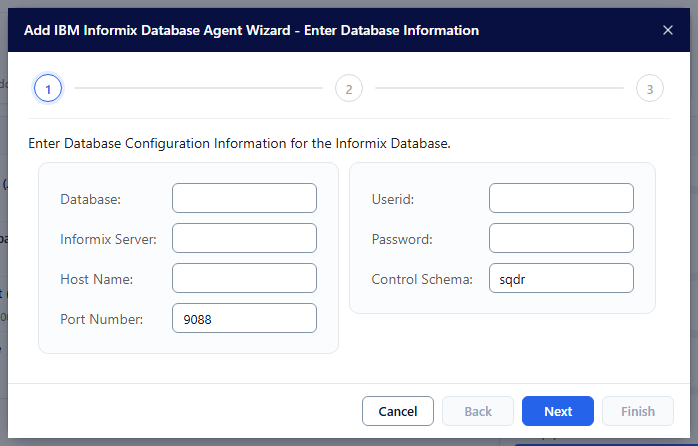
| Option | What it does | Default | When to change it |
|---|---|---|---|
| Database | An agent captures one database. | — | — |
| Informix Server | The Informix server name (INFORMIXSERVER), for example ol_informix1210. Converted to lower case. |
— | — |
| Userid | See Users and privileges. | — | — |
| Control Schema | The owner of the agent's control tables in the source database. Converted to lower case. | sqdr | When the agent's user isn't sqdr or informix: use the user's name (see Users and privileges). |
If the control schema holds an SQDR Plus v3 agent, Next offers to manage that agent remotely (see An existing agent in the control schema).
Step 2: Control DB
<New Control DB> creates a staging database for this agent; an existing one puts the agent in it, in its own schema. See Step 2: Control DB.
Step 3: Logging
The defaults send no email. See Step 3: Logging.
Finish registers the agent (see Finish the wizard) and creates it Stopped.
Check that capture is running
- Select the agent in the tree and click Start/Restart (see Start the agent).
- On the agent's Summary tab, the agent shows Running, its worker shows no error, and the log position moves forward as the database changes.
- If not, the agent's Diagnostics tab shows why, and the Informix server's
message log shows the CDC API's messages, such as "CDC: Log Reader: ERROR: could not get logid". On the database
server,
onstat -g cdclists the CDC sessions (Informix 11.50.xC4 and later): the agent's session appears while it runs.
After the first baseline
After you create the SQDR source, add tables to an incremental group and run its first baseline, check:
- The agent's Subscriptions tab lists them, and the source's Agent
Summary tab in the Data Replicator Manager shows the agent's
status.
onstat -g cdc tablelists the tables the CDC sessions capture.
Create the SQDR source
In the Data Replicator Manager, create a source for the same database:
- Connection: the SQDR bundled Informix driver, the IBM Informix ODBC driver, or the IBM Db2 ODBC driver on Informix's DRDA port, with a connection string from the template (see Connection string). The bundled driver comes with SQDR and is sometimes faster; the IBM Informix driver is a separate installation (the Informix Client SDK), and updating it may mean uninstalling and installing it again; the IBM Db2 ODBC driver has some data type limitations.
- Login: the Replicator Service's own login (the replication user in Users and privileges), with
CONNECTandSELECTon the tables to replicate. - Incremental replication: when the Replicator Service finds the agent's control schema in the database, the source allows incremental replication from it. Check that Capture Agent Schema is the agent's control schema (see Incremental Replication).
Through a Db2 for LUW server. Because the IBM Db2 ODBC driver uses DRDA, the Replicator Service can also reach Informix through a Db2 for LUW server that acts as a gateway, for example when SQDR runs outside the Informix server's network. Catalog the Informix database on the Db2 server:
db2 catalog tcpip node ifxserv remote ifxserv server 9089
db2 catalog database ifxdb as ifxdb at node ifxserv authentication SERVER
and connect SQDR to the Db2 server, for example HOSTNAME=mydb2server;PORT=50000;DATABASE=ifxdb. If creating
subscriptions or checking criteria in the Subscription Wizard then fails with a syntax error, clear Quote SQL
identifiers (see Replication defaults) while you create them, and select
it again afterwards; no restart is needed.
Then set up the destination, following its page under Destinations: it says when to create the incremental group (for Databricks, once the Spark connector runs).
Connection string
| Driver | Connection string | Notes |
|---|---|---|
| SQDR bundled Informix driver | HostName=myhost;PortNumber=9088;Database=mydb |
On Linux (Docker), add Client_Locale=en_US.utf8. |
| IBM Informix ODBC driver | Server=myconn;Host=myhost;Service=9088;Protocol=olsoctcp;Database=mydb;DELIMIDENT=Y |
Server is the Informix server name. On Windows you can also define the connection with Setnet32 and use Server=myconn;Database=mydb. The Replicator Service adds DELIMIDENT=Y if it's missing and, on Linux, CLIENT_LOCALE=EN_US.UTF8. |
| IBM Db2 ODBC driver | HOSTNAME=myhost;PORT=9089;DATABASE=mydb |
Connects to Informix's DRDA port. |
Resource use on the Informix server
- Nothing installed: SQDR install no software on the Informix server and connect over the network only, so they work with Informix on any platform it supports.
- Ports: the agent (Informix JDBC driver) and the Replicator Service with the SQDR bundled or IBM Informix ODBC
driver connect to the Informix protocol port (
onsoctcp, typically 9088); the IBM Db2 ODBC driver connects to the DRDA port (typically 9089). - Users: Stelo Capture creates no users; it connects as the user you give the wizard (see Users and privileges).
- Objects: when the agent first starts, it creates its control tables in the database, owned by the control schema, and a procedure the Replicator Service uses to list the tables you can subscribe to.
- Change capture: the agent reads the changes through the CDC API in
syscdcv1; full-row logging on the tables you replicate makes their log records larger. The logical log must keep the changes until the agent has read them (see Keeping the logical log for the agent).
Settings
These properties on the agent's Configuration tab are specific to Informix (see Properties by source database):
| Property | What it does | Default |
|---|---|---|
ifxReadSize |
The most change records the agent asks the CDC API for at a time. A positive number overrides the built-in value. | 50 |
ifxBufferSize |
The size, in bytes, of the buffer the agent reads the change records into. A positive number overrides the built-in value. | 10 MB |
charsetName |
The character set used to decode the captured data. | the database's |
Data types
The Replicator Service maps Informix types to the destination's as described in Data type
mapping. LOB values aren't staged: the Replicator Service reads them from
the source table (see LOB and long columns). An Informix row's ROWID can be
replicated for snapshots only (see RRN and ROWID columns). JSON and BSON columns
are replicated as their JSON text (see JSON columns).
Limitations
- Keys. Each replicated table needs a primary key or unique index. See Tables.
- Schema changes. No ALTER processing, and a subscribed table can't be altered or dropped (full-row logging). See Tables.
- Logical log. If Informix reuses a logical-log file before the agent has read it, the tables need a new baseline. See Keeping the logical log for the agent.
- One agent per database. See Tables.
- Case-sensitive names. Informix schema and table names are case-sensitive. In Add Publications (see Publish tables), the search fields change what you type to upper case, but the search still finds lower- and mixed-case names that match.
- Agent's user. The instance owner or a user named like the control schema, with DBA authority on
syscdcv1. See Users and privileges. - Encryption, high-availability clusters and cloud services: ask Stelo Support. See Supported configurations.
Troubleshooting
Problems and messages, with their causes and fixes, are in Troubleshooting › Informix.