Manage an agent's subscriptions
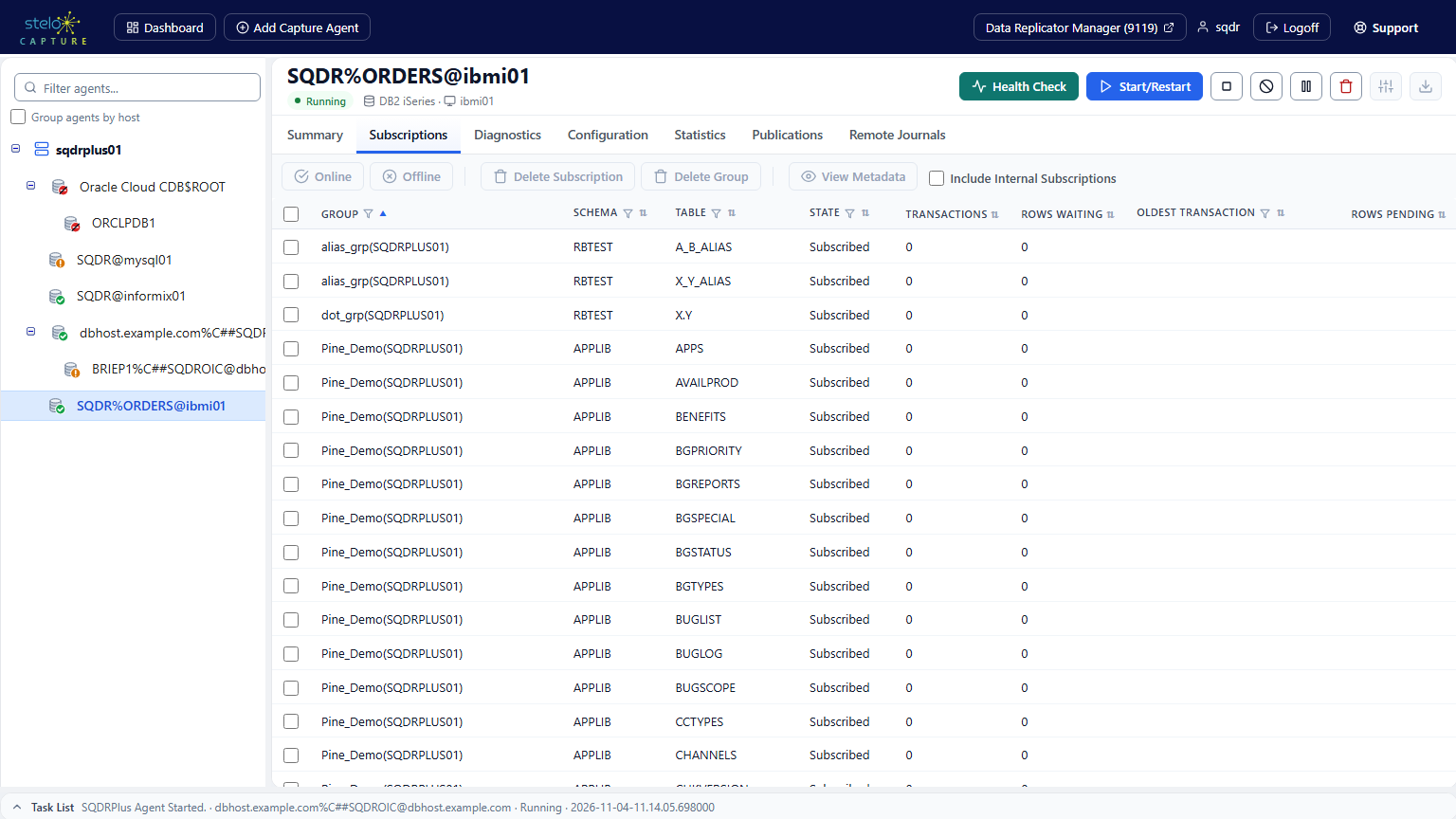
Every table that SQDR replicates incrementally through this Capture Agent is a subscription: one for each member of an incremental group in the Data Replicator Manager. The agent's Subscriptions tab shows how much captured change data waits for each one. Use it to:
- check that SQDR is applying the changes, and find the tables behind a backlog;
- see which tables need attention: a baseline still running, capture stopped, or a changed source table;
- stop capturing a table for a while, and start again;
- clean up subscriptions that no SQDR group uses any more, so their change data doesn't pile up.
Check that the changes are being applied
- Oldest Transaction moves forward over time while SQDR fetches the changes. If it stays put, check that the Replicator Service is running and that the incremental group isn't paused. The Group column names the group and the computer that runs its Replicator Service. If the group no longer exists, clean up.
- Rows Waiting is what's captured and waiting for SQDR. The largest numbers show the tables behind a backlog; a number that keeps growing means the group isn't keeping up.
- Rows Pending is the rows of transactions still open on the source. SQDR can apply them only once they commit: a large number means a big transaction is in progress.
Tables that need attention
| State | What it means | What to do |
|---|---|---|
| Baseline | The subscription is waiting for its baseline or running it. | Nothing: changes are applied once the baseline is done. |
| Offline | Changes to the table aren't captured. | Select it and click Online (see below). |
| Altered/Dropped | The source table was altered or dropped, so the agent's copy of its definition is out of date. | See ALTER processing and Take subscriptions offline and online. |
Stop capturing a table for a while
Select the subscriptions and click Offline: the agent stops capturing their tables' changes, for every group that subscribes to them. Online starts capturing again; it also resumes a Db2 for i worker taken offline on the Summary tab. What happens to the changes made in between, and when a new baseline is needed, is in Take subscriptions offline and online.
To remove a table from replication for good, remove the member from its group in the Data Replicator Manager, not here.
Clean up subscriptions SQDR no longer uses
A subscription is orphaned when no Replicator Service uses it any more: its change data is never fetched or pruned, and it fills the staging database. This happens when:
- the Replicator Service was moved to a different control database;
- the incremental group stopped running for good, or was deleted while the agent couldn't be reached;
- SQDR was uninstalled before the incremental groups were deleted.
To remove them, filter Group to the old group, select its rows and click Delete Group (the group and all its subscriptions) or Delete Subscription (only the selected ones).
To find unused staging databases and groups, see Clean up unused staging databases and Reclaiming disk space in the staging database.
Check which key the agent uses
View Metadata writes a file with the selected subscriptions' source columns, the key columns the agent uses and, for Db2 for i, the journal. Use it to check the key, or send it to Stelo Support.
Validate Metadata
Stelo Support may ask you to compare the agent's copy of the table definitions with the source tables: choose Support › Show Support Tools, open the server node's Maintenance tab, choose the agent and the task Validate Metadata, select the subscriptions and click Run. Validate only reports differences; use Alter and Force, which make SQDR process the tables as altered, only with Stelo Support.