Summary tab
A Capture Agent's Summary tab shows whether the agent, each of its log readers (workers) and its pruner are running, and how far each worker has read in the source log or journal. Use it to:
- check that the agent is capturing, when changes stop arriving at the destination;
- find out why the agent shows Warning;
- see roughly how far behind the source each worker is;
- take a worker offline, or hand it to the failover agent;
- see how many rows the agent replicated per day.
For the whole server, see the Dashboard.
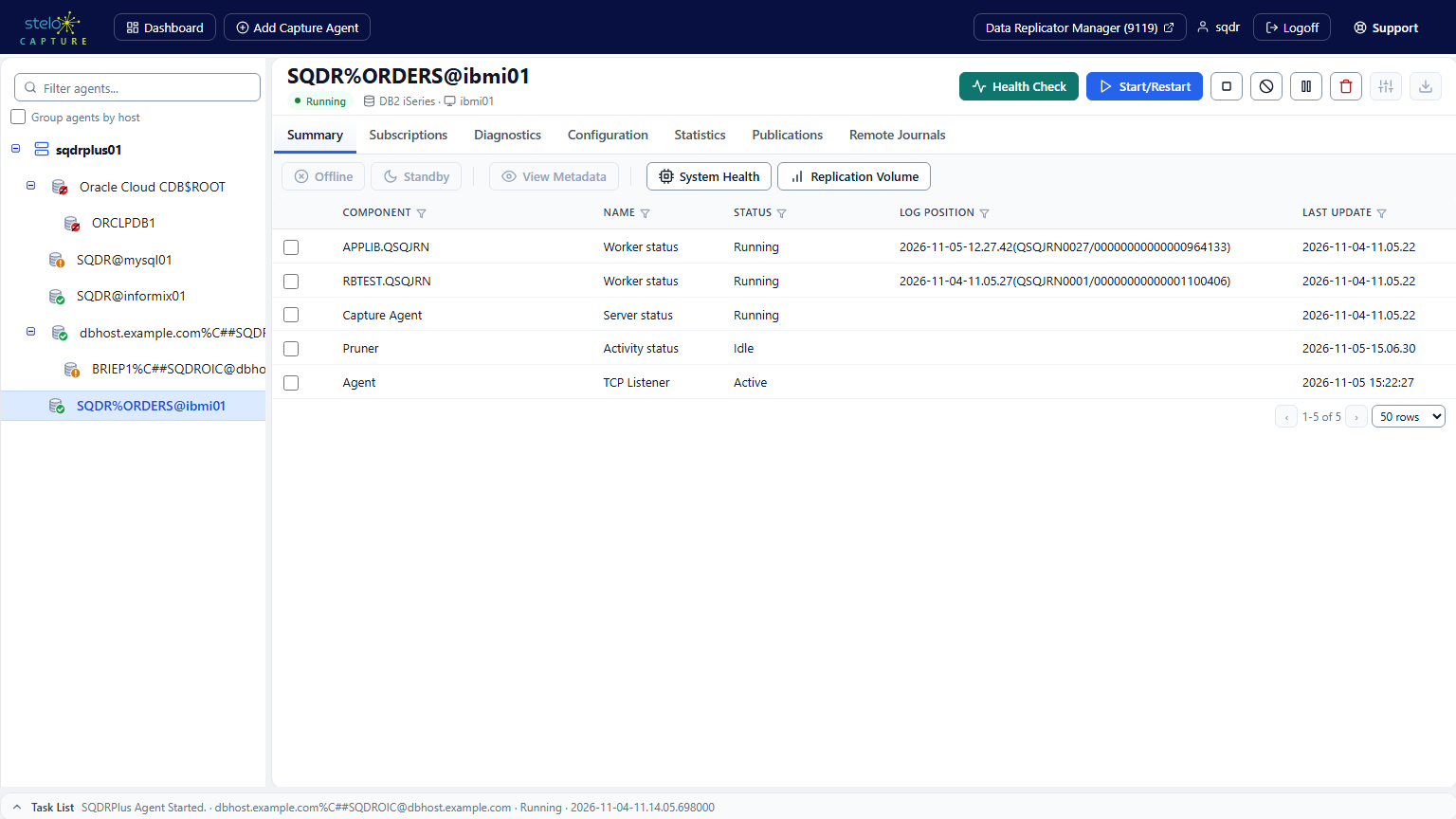
Check that the agent is capturing
A worker reads the source log or journal and stages the changes of the subscribed tables. A Db2 for i agent has one
worker per journal, named after the journal (with @host for a remote journal); other agents have one, Common.
A worker's Log Position is the last record it processed: for most sources the record's timestamp, followed in parentheses by the source's own position. A timestamp that keeps advancing means the worker is reading; compared with the current time, it shows roughly how far behind the source the worker is. If it doesn't move while the source is busy, run a Health Check.
| Source | Position in parentheses |
|---|---|
| Db2 for i | journal receiver and sequence number |
| Db2 for LUW | log sequence number (hexadecimal) |
| SQL Server | Change Tracking version or CDC log sequence number |
| Oracle | system change number (SCN) |
| MySQL, MariaDB | binary log file and offset |
| PostgreSQL | log sequence number (LSN) |
| Informix | log position (shown without a timestamp) |
On Db2 for i, a journal's worker isn't shown when no subscriptions are active on that journal, or when all are offline and the agent was restarted. It appears again once a subscription on that journal is online.
Why the agent shows Warning
The agent's status shows Warning (and the tree a warning icon) when a worker is Failed, congested, starting or paused, the Capture Agent is starting, or the TCP listener is unreachable. Two other states:
- Disabled: the Launch Agent doesn't start the agent (see Keep an agent stopped).
- Standby: the agent's staging database is a Db2 HADR standby; the Launch Agent keeps the agent stopped until a takeover.
| Component / Name | Status | Meaning and what to do |
|---|---|---|
| worker / Worker status | Running(Congested) | The worker has fallen behind the source by more than congestedThreshold (5 minutes by default). See When a Capture Agent falls behind. The suffix can follow other values too. |
| Paused | The worker isn't reading, for example because the storage monitor paused log reading, during host maintenance, or briefly while subscriptions go online or offline. | |
| Quiesced | The worker has read everything and waits for the agent to shut down. See Quiesce. | |
| Stopped | The worker is stopped, for example taken offline (Db2 for i). | |
| Failed | The worker stopped on an error. Look at the Diagnostics tab or run a Health Check. | |
| Standby:agent | High-availability failover only: another agent (named after the colon) owns this worker; this agent takes over if that one stops updating it. | |
| Capture Agent / Server status | Running | If TCP Listener is Unreachable at the same time, the agent process has most likely ended unexpectedly. |
| Pruner / Activity status | Running, Idle | Whether the pruner is removing applied change data right now. The row appears after the first prune cycle. See Control how staged changes are pruned. |
| Agent / TCP Listener | Unreachable | The SQDR Control Center can't reach the agent on its port: the agent isn't running, is still starting, or has stopped. This row comes from the Control Center contacting the agent; the other rows show what the agent itself records. |
Take a worker offline or hand it to the failover agent
- Offline: the selected workers stop reading their journal while the others continue. To resume, bring one or more of the worker's subscriptions Online on the Subscriptions tab.
- Standby: hands the selected workers to the other agent sharing the failover table (agents with
usingFailover=trueonly), to move a worker to the other node on purpose. - View Metadata (Db2 for i): writes a file with the metadata of the selected workers' journals, for Stelo Support.
Check the agent's memory and CPU
When the agent is slow or uses too much memory or CPU, System Health opens the System Health dialog for this agent's process only. Its Thread dump button writes a thread dump of the agent to its log, for Stelo Support.
See how many rows the agent replicated
Replication Volume shows how many rows went through the whole pipeline (captured, staged, applied by every subscription and then pruned): the rows applied, the daily average and the busiest day, and the rows pruned per table. It's counted from the agent's log files when you open it, so it covers only the period those files still cover. If it finds nothing, no changes were staged and applied in that period.
Related
- Configuration properties, for
congestedThresholdandusingFailover