Service settings
Service Settings holds what applies to one Replicator Service as a whole: replication defaults, logging and retention, email, who may manage it, and the macros and secrets that sources, destinations and subscriptions share. The replication defaults (the Replication and Subscription Wizard tabs) are described in Replication defaults.
Connect, Disconnect and Remove
These buttons act on the Data Replicator Manager's link to the service, not on the service itself.
- Disconnect leaves the service replicating. Use it to stop monitoring a service you aren't working with, which reduces network traffic and load. It also resets the column layouts you saved for the tables.
- Remove takes the service off the server list in this browser only; nothing changes on the service. To manage it again, add it with Connect To Service.
Properties
Saving changes
Settings take effect when you click Save, without restarting the service unless a setting says otherwise. Each sub-tab is saved on its own. Every change is recorded in the audit journal.
Service
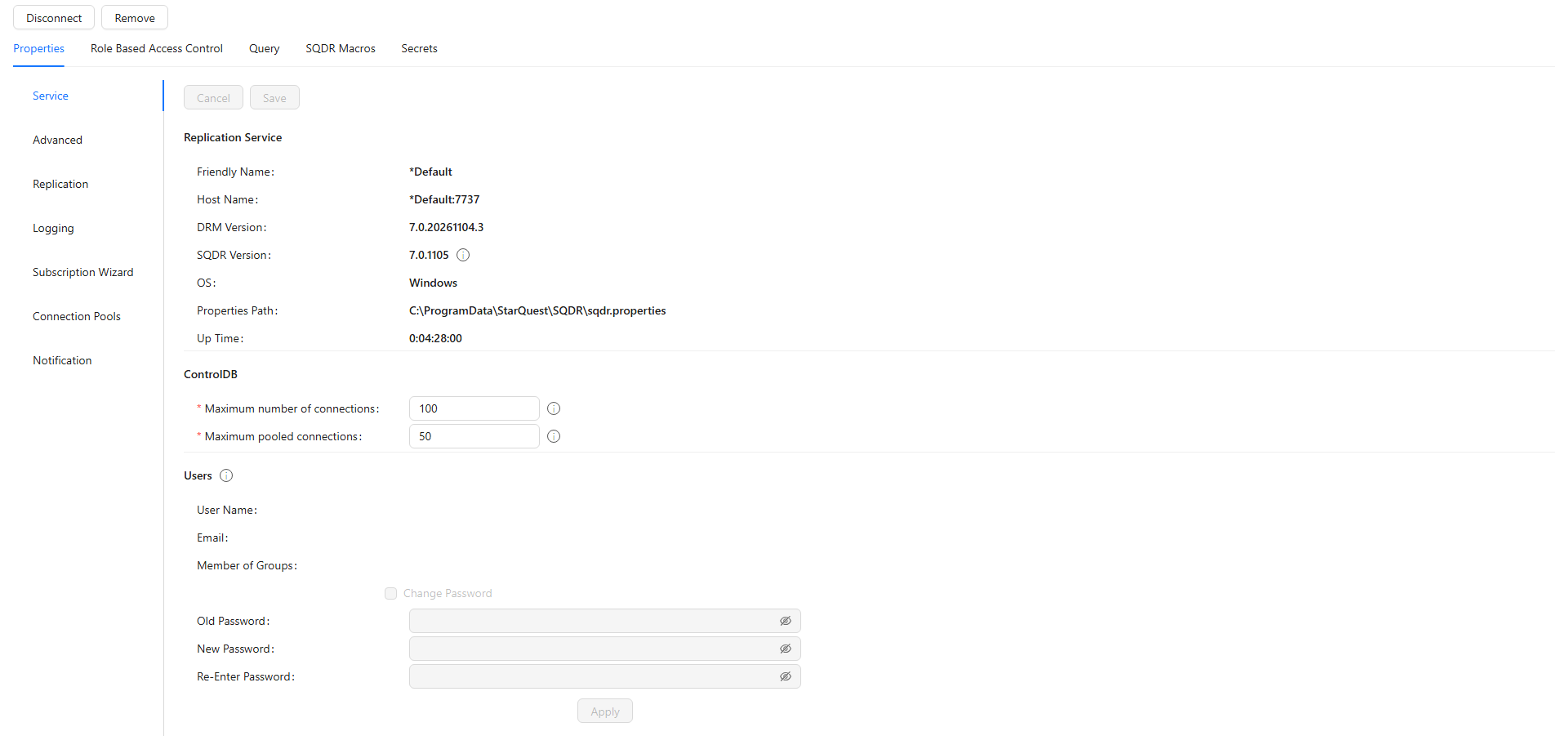
Replication Service
Give SQDR Version to Stelo Support when you report a problem. Properties Path is the file that holds the
control database connection and the service's listener settings: C:\ProgramData\StarQuest\SQDR\sqdr.properties on
Windows, /var/sqdr/sqdr.properties in the container.
ControlDB
| Option | What it does | Default | When to change it |
|---|---|---|---|
| Maximum number of connections | The most connections the service opens to its control database. It doesn't limit connections to sources or destinations, even on the same database server. Must be at least Maximum pooled connections. | 100 | Increase it if operations wait for, or fail to get, a control database connection (for example, "Could not add connection to list") when many groups run at once. |
| Maximum pooled connections | How many unused control database connections are kept open for reuse. How long they stay open is set on Connection Pools. | 50 | Lower it to hold fewer idle connections on the control database. |
Users
With Role Based Access Control on, after you change your password with Change Password, the Data Replicator Manager uses the new password for this service. See Role Based Access Control.
Advanced
Every Replicator Service setting, including those with no field on the other tabs.
Each property is described in Service properties. Change one here only when that page, a Help Center article or Stelo Support tells you to.
Settings that can lock you out
The table also lists the control database connection (ctrlDSN, ctrlConnectString, ctrlUID, ctrlPwd), the
listener addresses (grpcADDRPORT, grpcTransADDRPORT) and the access control settings (rbacEnabled,
rbacKeySeed). A wrong value can disconnect the service from its control database or from the Data Replicator
Manager. Change the control database connection and access control with the
SQDR Configuration Tool instead; see
Moving the control database and Turn on access control.
Replication
Service-wide defaults, which groups can override, for how data is copied, how incremental groups handle source schema changes, and how change data logging delivers before images. See Replication defaults.
Logging
The logs themselves are on the Monitoring page; see Logs.
History Logging
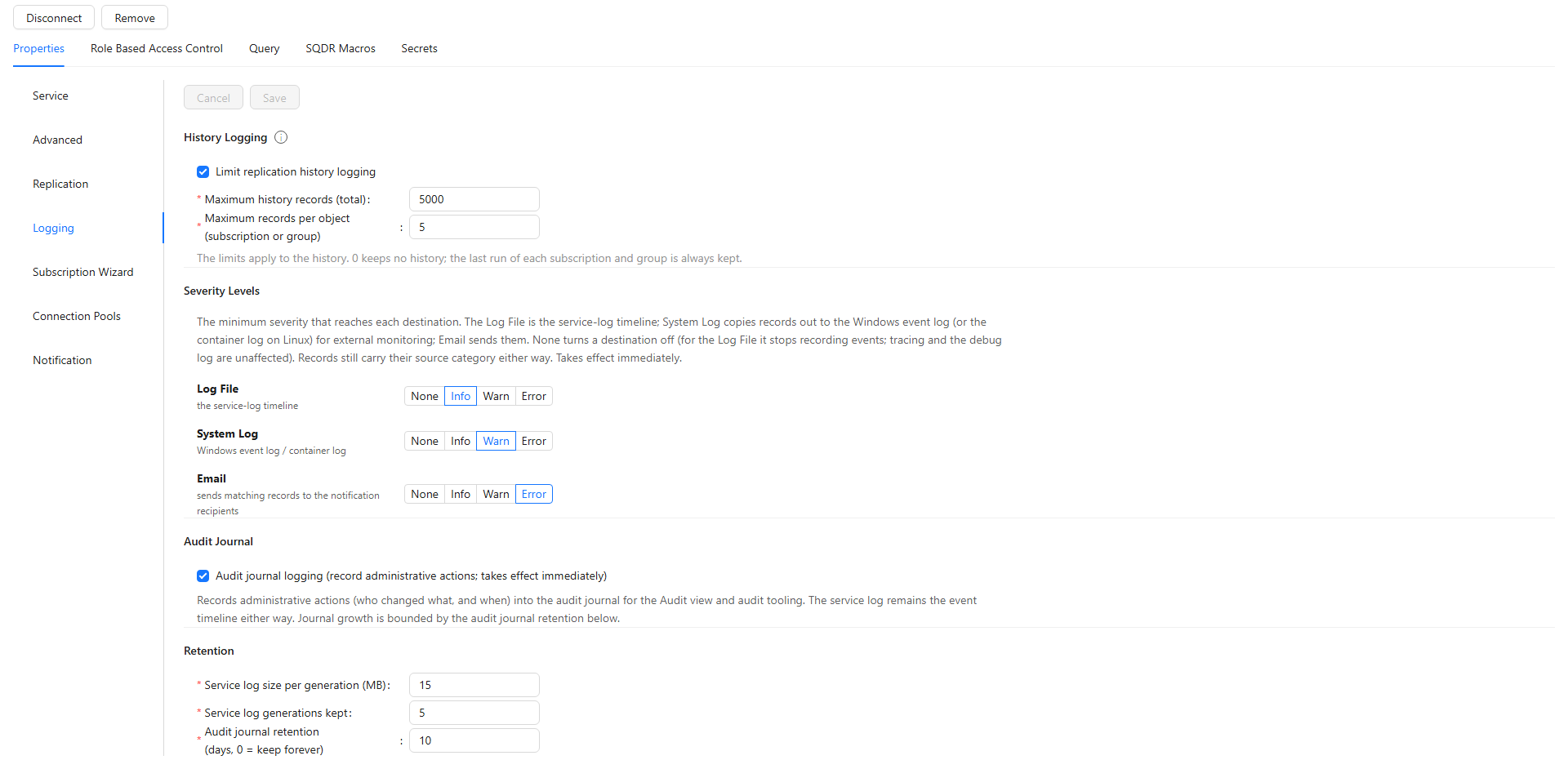
Every run of a subscription or group adds history (statistics and messages, shown as replication events) to the control database. Less history keeps it small and fast.
| Option | What it does | Default | When to change it |
|---|---|---|---|
| Limit replication history logging | Deletes the oldest history when the limits below are exceeded. Off keeps all history. | on | Keep it on. Turn it off only if you remove history yourself. |
| Maximum history records (total) | The most history records kept in total (0 to 1000000). 0 keeps only the last run of each subscription and group. | 5000 | Lower it to keep the control database small; raise it to keep more history. |
| Maximum records per object (subscription or group) | The most history records kept for each subscription and each group (0 to 5000). 0 keeps only the last run. | 5 | Raise it to see more past runs of each subscription. |
The last run of each subscription and group is always kept; the limits apply to earlier runs. To delete history yourself, use Delete Statistics. How pruning works: How long history is kept.
Upgrading to SQDR 7.0: a limit of 0 changed meaning. Check this tab after upgrading.
Severity Levels
The service records its events (starts and stops, replication failures, state changes, ODBC driver warnings and so on) in its service log. Choose the least severe event that reaches each destination: Info (everything), Warn (warnings and errors), Error (errors only) or None (off).
| Destination | What it is | Default | When to change it |
|---|---|---|---|
| Log File | The service log file, shown on the Service Logs tab of the Monitoring page. None stops recording events (tracing and the debug log are not affected). | Info | Keep Info. |
| System Log | Copies events to the Windows event log (Application log, source SQDRSVC), or to the container log in Docker, for your monitoring tools. |
None | When your monitoring tools watch the Windows event log or the container log. |
| Emails events to the notification recipients. Available once email is set up. | Error | Warn to be told about warnings too; Info only for testing, since it sends many emails. |
Audit Journal
| Option | What it does | Default |
|---|---|---|
| Audit journal logging | Records the requests made to the Replicator Service in the audit journal (see Audit tab for what's recorded). | on |
Retention
| Option | What it does | Default | When to change it |
|---|---|---|---|
| Service log size per generation (MB) | The size at which the service log file is renamed and a new one started, 0 to 1024; 0 leaves rotation to an external tool. | 10 | Increase it to keep a longer history in each file. |
| Service log generations kept | How many service log files are kept, the current one included. The oldest is deleted when a new one starts. | 5 | Increase it to keep more history, within your disk space. |
| Audit journal retention (days, 0 = keep forever) | How long audit journal entries stay in the control database. Older entries are deleted about every 15 minutes. | 7 | Increase it if your audit policy requires; 0 only if you remove old entries yourself, since the journal grows with every action. |
The service log files are in C:\Users\Public\Documents\StarQuest\SQDR\Logs on Windows and /var/log/sqdr in the
container.
Subscription Wizard
Defaults for how new subscriptions map source columns to destination columns. See Replication defaults.
Connection Pools
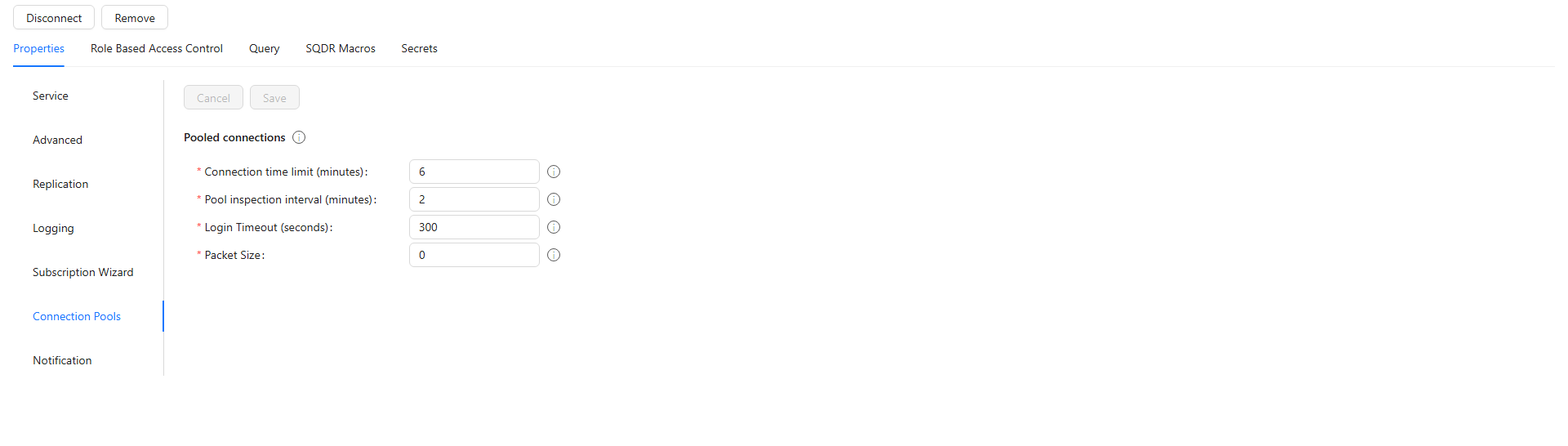
The service keeps unused connections to sources and destinations open for reuse, which saves opening a new one each time. These settings apply to every source and destination.
| Option | What it does | Default | When to change it |
|---|---|---|---|
| Connection time limit (minutes) | How long an unused connection stays open before it's closed, 0 to 60. 0 keeps unused connections open indefinitely. | 6 | Lower it if a database or firewall closes idle connections sooner (the next use of such a connection fails); raise it to reuse connections more. |
| Pool inspection interval (minutes) | How often the service looks for connections past the time limit. A connection can stay open for up to the time limit plus this interval (for example, 30 + 3 minutes). | 2 | Shorter to close idle connections closer to the time limit. |
| Login Timeout (seconds) | How long the service waits for a new ODBC connection. | 30 | Increase it for slow networks or databases that take long to accept connections. |
| Packet Size | The ODBC packet size set on new connections. 0 leaves the driver's default. | 0 | Only if a driver or Stelo Support recommends a value (for example 32767). |
Notification
How the Replicator Service sends email: the recipients, and SMTP, Microsoft Graph API or GMail REST API. See Email notifications, which also covers the Capture Agents' email.
Query
Runs ready-made, read-only reports against the control database (incremental group and subscription settings and statistics, schedules, snapshot results and more), to answer questions such as "which subscriptions ran with errors" or "how fast is this group applying changes" without a database tool.
The scripts offered depend on the control database (SQL Server or Db2 for LUW). A condition in Where (for example
group_name = 'SALES_GROUP') is added to the script's own condition with AND, so use the script's column names.
Export saves the results as a JSON file.
| Script | What it reports |
|---|---|
| IR_Group.sql | Incremental groups and their options, decoded. |
| IR_GroupStats.sql | Incremental group activity: rows and bytes applied, rows per second, how busy the group is. |
| IR_Subscription.sql | Incremental subscriptions and their options, decoded. |
| IR_SubscriptionStats.sql, IR_SubscriptionStats_Cumulative.sql | Incremental subscription activity, ranked, since the service started and cumulative. |
| IR_keylog.sql | The key log (ir_keylog) of incremental groups that log change data to it; see Key log. |
| Schedule.sql | Scheduled groups and subscriptions. |
| Statistics.sql, Subscription.sql | Snapshot and baseline results. |
| TargetChecker.sql, TargetChecker_LastTime.sql | Results of the TargetChecker comparison of source and destination row counts. |
With Role Based Access Control on, Query needs the admins role level (90) by default.
Control Database
The Control Database tab shows the control database this Replicator Service uses and how far it has been upgraded:
- About this control database: its Type and Driver, its Level, and This service's level, the level this service brings it to.
- Upgrade history: each upgrade step, when and on which computer it was applied, by which service build, and its outcome.
- A warning when the control database's level is lower than the service's: the upgrade hasn't completed, and the service tries it again at its next start. The warning shows the last failure.
See Upgrades.
Licenses
The Licenses tab shows and changes the license keys of the service's computer, and the license expiration warning. See The Licenses tab.
Related
- Group properties: group-level overrides of the replication settings
- The Replicator Service
- Collecting logs and diagnostics for Stelo Support