Change Capture Guide
Stelo Capture captures the changes committed on your source databases, so that SQDR can replicate them incrementally: after a table's first full copy (the baseline), SQDR applies only the changes. For each source database, a Capture Agent reads the database's log (the journal on Db2 for i) and keeps the committed changes to the tables you replicate in its staging database until SQDR has applied them. You manage the agents in the SQDR Control Center.
This guide covers setting up, running and looking after capture. What SQDR does with the changes is in the Replication Guide (SQDR), and what each source database needs is under Databases.
Find your task
Get started
- The SQDR Control Center: open it and sign in; its Dashboard shows what needs attention on the server.
Set up capture for a source database
- Add a Capture Agent: one agent for each source database, then start it.
- Publish tables: required for Oracle sources, before SQDR can subscribe to their tables.
Change how an agent works
- Change the configuration, with the configuration properties
- Manage an agent's subscriptions: check what's waiting for each table, take tables offline, and clean up subscriptions SQDR no longer uses.
- Apply changes in source order across tables
- Change the passwords Stelo Capture uses
Check that capture is working, and find out why it isn't
- Start, stop and delete a Capture Agent
- Health Check: run it first when replication is late or an agent shows Warning.
- Summary tab: check that an agent is capturing, and why it shows Warning.
- Follow an agent's workload and lag and read its logs.
- When an agent falls behind, and the storage monitor, which keeps the staging database from filling up.
Keep capture running
- Control how staged changes are pruned and keep the source's journals and logs in check
- Pause capture during host maintenance and quiesce an agent before you stop it
- Remove Stelo Capture from the source databases, when a source is no longer replicated.
Recover after a failure, a restore or a large change on the source
- Startup mode: after a fail-over, a restore, or when the destinations are out of step
- Take subscriptions offline and online: before a large change to a source table
- Read the log again from an earlier point
Look after the Stelo VM
- Manage the Stelo Capture server: start and stop all agents, and where the server keeps its files.
- Look after the Db2 databases on the Stelo VM: backups, disk space and Db2 updates.
- Run a standby server with Db2 HADR: for high availability or disaster recovery.
- Move to a new server
Script these tasks
How capture works
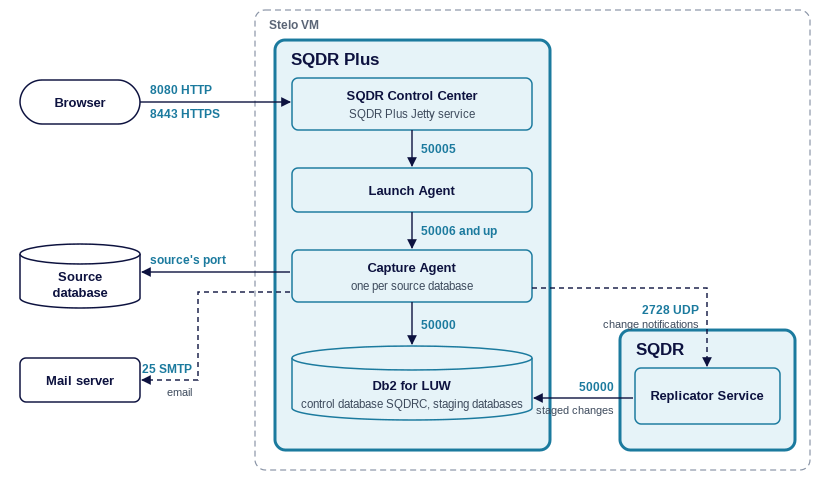
The usual setup: both parts of SQDR on one server, the Stelo VM (they can also run on separate servers). The ports are the defaults; the source's port depends on the database (see Ports). The Launch Agent is the Stelo Capture service that starts and stops the Capture Agents on a server and keeps their configuration. The staging databases are Look after the Db2 databases on the Stelo VM.
- Baseline. When a table joins an incremental group, the Replicator Service copies it in full, reading the source table through its own ODBC connection (see Incremental groups).
- Capture. The Capture Agent reads the changes the source database records, from its last position on, and stages the changes to the tables you subscribed to in its staging database. It saves its position with the staged changes, so after a restart it reads on from there. If the source no longer holds changes the agent hasn't read (a log file was deleted, or a retention period passed), the agent loses its position and the tables need a new baseline. Large object (LOB) values are usually not staged: the Replicator Service reads them from the source table when it applies the change (see LOB and long columns).
- Apply. The Replicator Service asks the agent for the staged changes and applies them to the destination.
- Schema changes. Where the source supports ALTER processing, an altered table goes on replicating without a new baseline; otherwise it needs one, which the group runs by itself when Automatic Snapshot is on. Each source's page says whether it supports ALTER processing.
For Java connector destinations (Snowflake, Databricks, BigQuery, Microsoft Fabric, Kafka, Amazon S3 Tables), SQDR Plus Apply extensions also write the data the Replicator Service passes them (see ODBC and Java connectors).