Connections
The Connections tab of the Monitoring page lists every ODBC connection the Replicator Service holds open, in use or pooled for reuse: to its control database, sources, Capture Agent staging databases and destinations. Use it to see what the Replicator Service does on each database, and to close a connection that's stuck or unwanted, for example:
- A replication seems stuck: find its connection and how long it has been in its current state.
- A database administrator asks which sessions belong to SQDR, or you need to free sessions on a database.
- Before database maintenance: check that no replication uses it, and close pooled connections.
How it works
The Replicator Service opens connections as needed and returns them to a pool for reuse. Each source and destination has its own pools, limited by its Maximum Number of Connections and Maximum Connection Pool Size (see Source properties and Destination properties). Pooled connections are closed after the time limit on the Connection Pools tab of Service settings.
The Replicator Service always keeps some connections to its control database. Changing a source's or destination's connection, or deleting it, closes its connections.
When a database drops the Replicator Service's sessions (a restart, a failover, or sessions killed by an administrator), the pooled connections to it are found dead, closed and replaced by new ones; see the connPoolServerLost service property.
The Connections tab
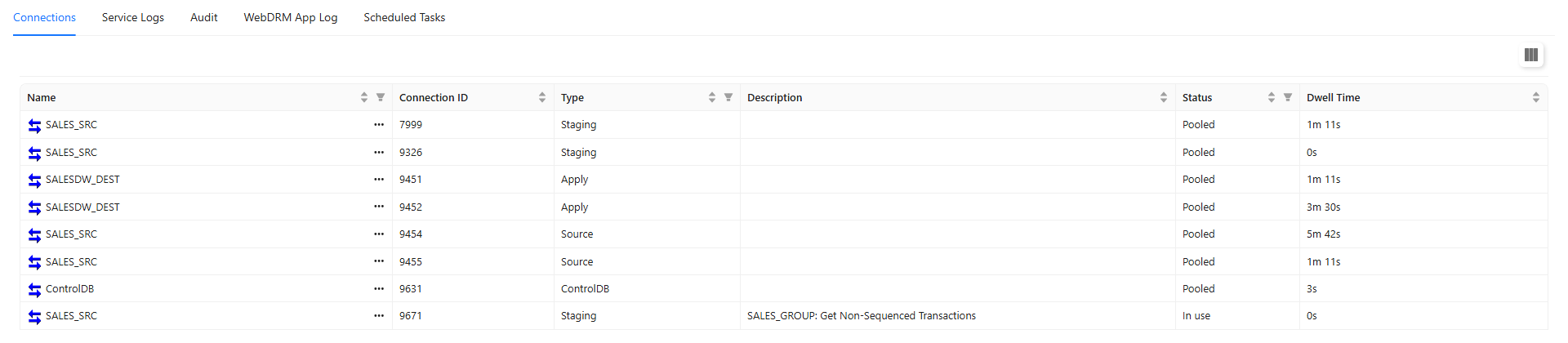
| Column | What it shows |
|---|---|
| Type | ControlDB (the Replicator Service's control database), Source, Destination (a destination, for snapshot replications, baselines and creating tables), Staging (a Capture Agent's staging database, for incremental sources) or Apply (a destination, for applying incremental changes). |
| Dwell Time | How long the connection has been in its current state. |
Status
| Status | Meaning |
|---|---|
| Waiting | A request for a connection waits because the source's or destination's Maximum Number of Connections are all in use; it gets one when another is released. |
| Expired | A pooled connection past its time limit (or beyond the pool size), about to be closed. |
| Zombie | Offered in the filter; the current Replicator Service doesn't put connections in this state. |
For an In use connection with a long Dwell Time, the Description names its group or subscription; the database's own session monitor shows what the session is doing.
Delete a connection
- A Pooled connection is closed right away.
- A connection in use by a replication asks whether to cancel the replication. OK cancels it: for a Staging or Apply connection, the connection itself; otherwise, the subscription named in the Description is stopped.
- A connection in use with an empty Description can't be deleted here: nothing happens.
Canceling a replication
A snapshot or baseline canceled this way leaves the destination table incomplete. Check the table and run the subscription again.
To take a source's or destination's connections out of use for maintenance, first pause its incremental groups (Pause on the source or destination; see Sources), then delete the pooled connections.