Replication defaults
Each Replicator Service has service-wide defaults: how data is copied and committed, what incremental groups do when a source table is altered, and how new subscriptions map source columns to destination columns. Groups and subscriptions use them unless they override them:
- A group overrides the copy settings in its Group Replication Settings, and the schema change and change data logging defaults on its Advanced tab.
- A subscription overrides the column mapping defaults with its Mapping Options.
They're under Service Settings › Properties › Replication and Subscription Wizard. A save applies immediately, without a restart (see Saving changes).
Replication tab
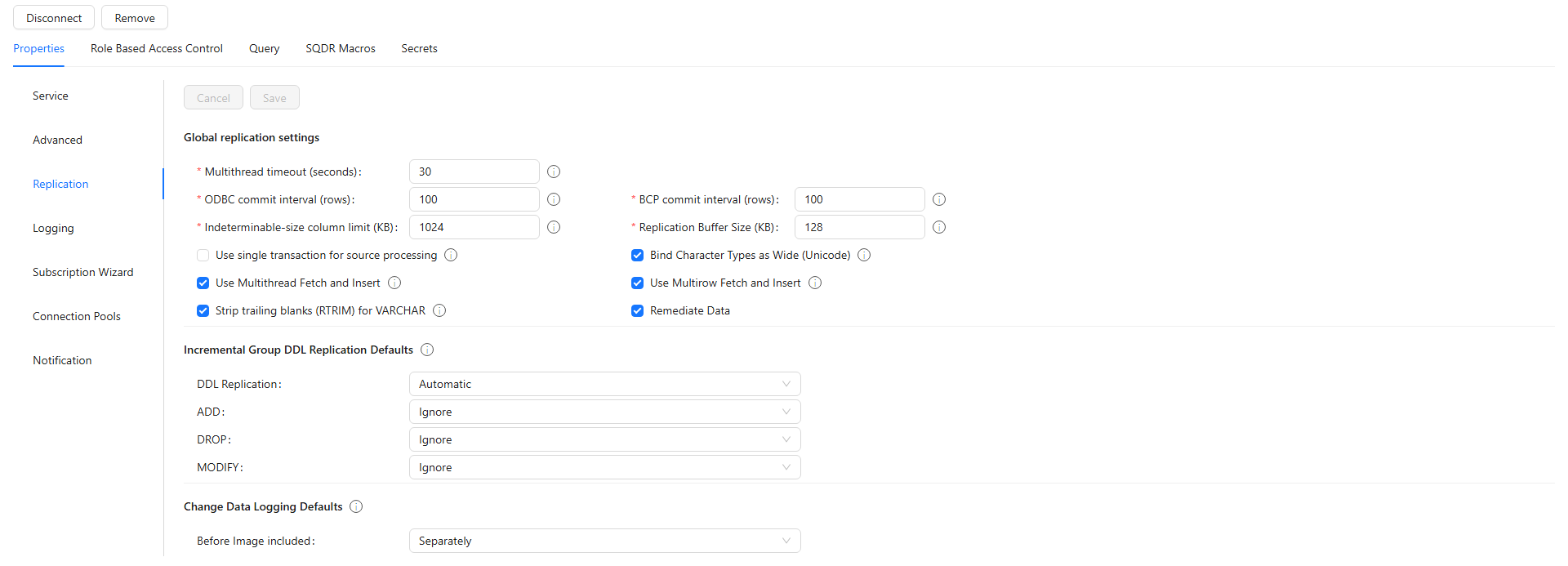
Global replication settings
These apply to every replication; a group can override each in its Group Replication Settings.
| Option | What it does | Default | When to change it |
|---|---|---|---|
| Multithread timeout (seconds) | How long the service waits for a fetch or insert buffer when Use Multithread Fetch and Insert is on. | 30 | Increase it if a replication fails with a timeout waiting for a buffer. |
| ODBC commit interval (rows) | About how many rows are committed at a time when rows are inserted through ODBC (the exact number varies because rows are fetched several at a time). 0 commits once, at the end of the table. Committed rows aren't rolled back if the replication fails. | 10000 | Lower it to reduce the destination's log and lock use on large tables; 0 to make the copy all-or-nothing. |
| BCP commit interval (rows) | The same, for destinations loaded with a native loader such as SQL Server Bulk Copy. | 20000 | As above. |
| Indeterminable-size column limit (KB) | The most data held in memory for a column whose size can't be known in advance (LOBs, and LONG and LONG RAW on Oracle sources). A larger value is truncated, with a warning, if the destination column is smaller than the limit; otherwise the replication fails. Values above 16 are rounded up to a multiple of 16. Also sizes the buffer for LOB data during incremental apply. | 1024 | Increase it if LOB values are truncated or a replication fails on a large value; see Replicated data is truncated in the destination column. |
| Replication Buffer Size (KB) | 10000 | Decrease it only if memory use is a problem or to work around a driver problem. | |
| Use single transaction for source processing | Whether source processing (SQL run on the source before a snapshot) is rolled back if the replication fails; only possible if no replicated rows were committed yet. | on | Turn it off to keep the results of source processing even when the replication fails. |
| Bind Character Types as Wide (Unicode) | Binds character data as Unicode (SQL_C_WCHAR); off binds it as single-byte characters (SQL_C_CHAR). This affects how data is moved, not how destination columns are created (see Promote CHAR types to wide-CHAR equivalent types on Subscription Wizard). |
on | Only to work around a driver that handles Unicode binding badly. |
| Use Multithread Fetch and Insert | Fetches and inserts on separate threads at the same time, which can be faster, depending on the number of columns and row length. | on | Turn it off only when Stelo Support asks you to. |
| Use Multirow Fetch and Insert | Only when both ODBC drivers support it. | on | Turn it off only to work around a driver problem. |
| Strip trailing blanks (RTRIM) for VARCHAR | Snapshots and baselines only, not incremental changes. | off | When the source pads VARCHAR values with blanks you don't want at the destination. |
| Remediate Data | Repairs invalid character data (such as invalid Unicode surrogate characters) during a baseline instead of failing the replication. | on | Turn it off if a replication should fail on invalid data rather than change it. |
Incremental Group DDL Replication Defaults
What incremental groups do by default when a source table is altered. A group's *Default setting uses these values; a group can override them on its Advanced tab. See ALTER processing.
| Option | Default |
|---|---|
| DDL Replication | On Demand |
| ADD, DROP, MODIFY | Ignore |
DDL Replication decides when a change is applied; ADD, DROP and MODIFY decide what is done.
Change Data Logging Defaults
| Option | What it does | Default |
|---|---|---|
| Before Image included | For change data logging: Separately logs the before image of an update as its own row. Groups can override it. | Separately |
Subscription Wizard tab
How new subscriptions map source columns to destination columns, used when a subscription is created or its columns are rebuilt; existing subscriptions don't change. For one subscription, use its Mapping Options.
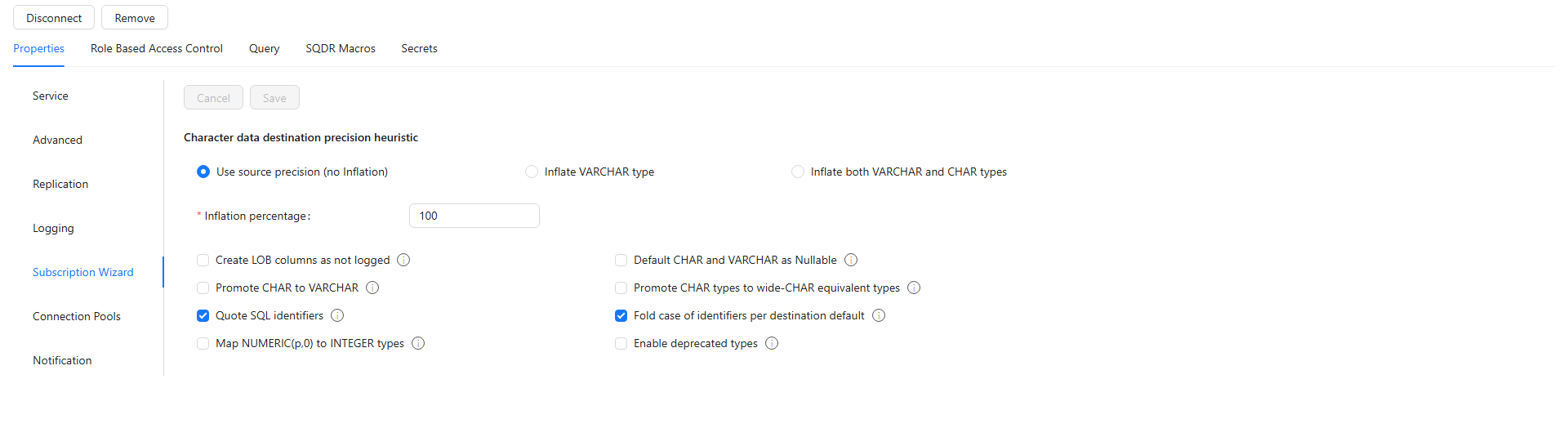
| Option | What it does | Default | When to change it |
|---|---|---|---|
| Character data destination precision heuristic: Use source precision (no Inflation), Inflate VARCHAR type, Inflate both VARCHAR and CHAR types | Makes destination character columns longer than the source's, so that text that needs more bytes at the destination isn't truncated. | Use source precision (no Inflation) | The source and destination encodings differ, for example single-byte EBCDIC or a double-byte code page to UTF-8. |
| Inflation percentage | How much longer. For example, 10 maps CHAR(10) to CHAR(11); if the result equals the source length, 1 is added. 200 triples the length, enough for any conversion. |
10 | Higher for encodings that need more bytes per character. |
| Create LOB columns as not logged | Creates LOB columns as NOT LOGGED, which some destinations (such as Db2 for LUW 9.5 and earlier) require for LOBs over 2 MB. It applies to every new subscription, including ones to destinations where the syntax is invalid. |
off | Turn it on only while you create subscriptions with LOB columns to such a destination, then turn it off. |
| Default CHAR and VARCHAR as Nullable | off | Destinations, such as Oracle, that treat an empty string as NULL. | |
| Promote CHAR to VARCHAR | off | To avoid blank-padded values at the destination. | |
| Promote CHAR types to wide-CHAR equivalent types | Such as NCHAR and NVARCHAR. |
off | Source text the destination's code page can't hold. |
| Quote SQL identifiers | Quotes destination names, so they can be reserved words or contain spaces, and keep their case. | on | Turn it off only if every name follows the usual SQL rules. |
| Fold case of identifiers per destination default | Converts destination names to the destination's preferred case (uppercase or lowercase) when the destination has one. Off keeps the source's case (with Quote SQL identifiers on). | on | Turn it off to keep lowercase or mixed-case names, for example from Informix to an uppercase destination. |
| Map NUMERIC(p,0) to INTEGER types | Maps DECIMAL(p,0) and NUMERIC(p,0) to INTEGER (up to 9 digits) or BIGINT (10 to 18); larger precisions aren't changed. |
off | Destinations where integers are more efficient. Not for destinations, such as Db2, that handle DECIMAL natively. |
| Enable deprecated types | Offers deprecated destination types (such as SQL Server datetime, text, ntext and image) when mapping columns. Only SQL Server hides them today. |
off | Only if an application needs those types; see Using the deprecated data types option. |
Related
- Group properties and Subscription properties: the overrides
- Service settings: the other tabs of Service Settings
- Service properties: every setting, including advanced ones